Apply LOTO to the Main Disconnect Panel (MDP) or facility Power Distribution Unit (PDU).
Prerequisites
Personnel requirements
Required persons
Preliminary requirements
Procedure
Finalization
1
-
15 minutes
5 minutes
Tools and test equipment
Item
Quantity
Part number
Manufacturer
Thick, Long Neck Flat Bladed Screwdriver
1
-
-
Digital Multimeter (DMM)
1
-
-
Brass Master Padlock with Brass Shackle
2
46-194427P320
-
Red LOTO Personal Lock Wrap
2
2393068
-
Multi-Locking Device (if multiple service personnel are involved)
1
46-194427P313
-
Red Warning LOTO Tag
2
46-194427P322
-
Line Cord Plug Cover
1
46-194427P231
Safety
Before working in any GE Healthcare MR suite or performing any GE Healthcare service procedure, you must:
Have read and understood all hazard conditions and safety requirements in the latest revision of the GE Healthcare MR Service Safety Manual (5452735).
Have successfully completed all relevant GE Healthcare Environmental Health and Safety (EHS) courses (or for non-GE employees, equivalent workplace training courses).
Comply with all site-specific training and workplace safety requirements.
If you have any safety concerns at any time, do not begin work or immediately stop work and move to a safe location. Immediately contact your supervisor or site safety officer for instructions on how to proceed.
Warning
Electrocution hazard
Dangerous and/or fatal voltages are present in the energized cabinet.
Follow LOTO steps to disable and make sure voltage levels are safe.
About this task
The power to the entire system can be removed by locking out/tagging out (LOTO) the Main Disconnect Panel (MDP) or Facility PDU. Prior to performing work on the PDU in ISC, the steps in this LOTO procedure must be completed by a LOTO Authorized GE Field Engineer (FE). Completing all steps in this procedure will ensure a safe environment when working on these parts.
Table 1.
Name of equipment
Number of locks
Titles of employees authorized to perform LOTO
Titles of affected employees
How to notify
PDU in ISC
2 per GE FE
GE Field Engineers
Hospital Personnel
Verbal, Posted signs
Energy source
Yes
No
Location of energy
Magnitude/type of energy
Electrical
x
Main Disconnect Panel (MDP) circuit breaker or facility PDU circuit breaker
380/400/415/480 VAC
Per Output of MDP or Facility PDU
Pneumatic
x
Hydraulic
x
Gas/Water/Steam
x
Chemical
x
Mechanical Motion
x
Gravity
x
Springs
x
Thermal
x
Stored Energy
x
Time discharge of internal capacitors
208 VAC, 420 VAC
Air Under Pressure
x
Oil Under Pressure
x
Water Under Pressure
x
Gas Under Pressure
x
Steam
x
Other
x
Topic ID: id_SL14015126-1191264
Power down before turning off main breaker
About this task
System Power Off, under Access tab, is for customer use since it will require one hour at the most to power down the system to cool down gradient coil temperature, and reduce B0 drift in customer scan level. For service LOTO, use system shutdown for immediate shutdown. However, note that it will be required to wait 1 hour after restoring power for certain calibration and/or customer scan.
Topic ID: id_SL14015128-1191264
System shutdown when system is in operator level
Procedure
To prepare for shutdown of equipment, notify affected personnel working in the area the LOTO is being performed.
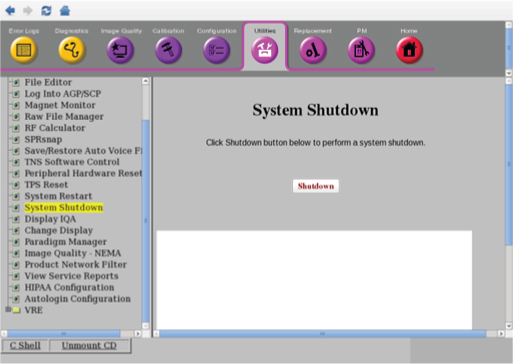
From the Common Service Desktop, select Utility > System Shutdown and click Shutdown to shutdown the PC and ICN.
Figure 1. System shutdown
Topic ID: id_SL14015130-1191264
System shutdown when system is in root level
Procedure
Notify affected personnel that LOTO will be applied.
Note: If system is login as root, refer to Powering Down from Root Level.
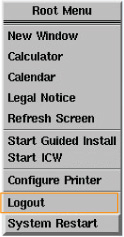
Right-click on the Linux desktop to access the Root Menu and then select Logout.
Figure 2. Logout
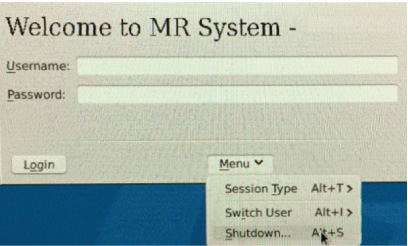
Select Menu > Shutdown on the Welcome login screen to shutdown the system.
Figure 3. Shutdown
Make sure the system is shut down.
Topic ID: id_SL28617-1191264
System cabinet PDU main breaker off
Procedure
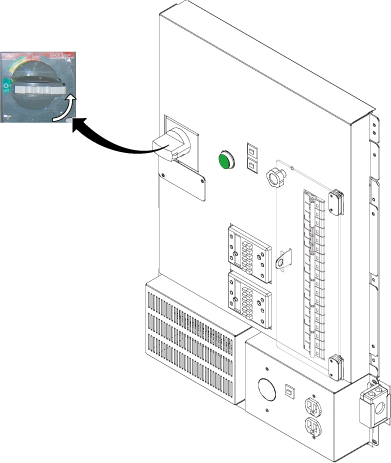
Rotate the larger main breaker labeled INPUT counter-clockwise to the green Off (O) position.
Figure 4. Main input breaker in the Off position
Topic ID: id_SL2889736-1191264
Lockout/tagout for MDP or facility PDU
Procedure
Notify affected personnel that LOTO will be applied.
Make sure the host computer is shut down.
Rotate the larger main breaker labeled INPUT counter-clockwise to the green Off (O) position.
Figure 5. Main input breaker in the Off position
Lock Out/Tag Out the PDU breaker on the MDP or facility PDU.
Wait five minutes for dissipation of stored energy.
Go to the ISC and discharge the stored energy by rotating the larger main breaker labeled INPUT counter-clockwise to the red On (I) position.
At the ISC, remove the ISC top terminal cover and check the AC Voltage between φA-B, φB-C, and φC-A (primary) on top of ISC and verify that the voltage is less than 1VAC.
At the system cabinet, rotate the larger main breaker labeled INPUT counter-clockwise to the green Off (O) position.