
- SIGNA™ Hero 3.0T Service Methods
- 5852800-8EN Revision 1.0
- 00000018WIA30BDE030GYZ
- id_123740261.21
- Oct 11, 2021 3:47:43 PM
KASC Boards Replacement
Prerequisites
| Required persons | Preliminary requirements | Procedure | Finalization |
|---|---|---|---|
| 1 | Not Applicable | 30 minutes | 30 minutes |
| Item | Quantity | Effectivity | Part number | Manufacturer |
|---|---|---|---|---|
| Standard Tool | 1 | - | - | - |
| Item | Quantity | Effectivity | Part number | Manufacturer |
|---|---|---|---|---|
| KASC Boards | 1 | - |
Refer to FRU Manual | - |
| ||||||||


Procedure
- Disconnect connectors from the front panel of the defective board.
Figure 1. KASC 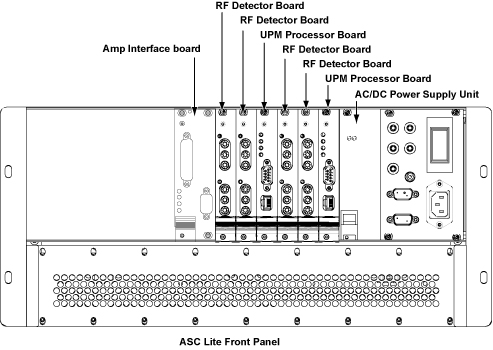
- Perform the following steps.
- Loosen 2 screws.
- Push the release tab.
- Open the extractor tab.
- Remove the board.
Note:The circuit board should be handled using only the faceplate, ejectors, and the edges of the board.
Figure 2. Board Removal 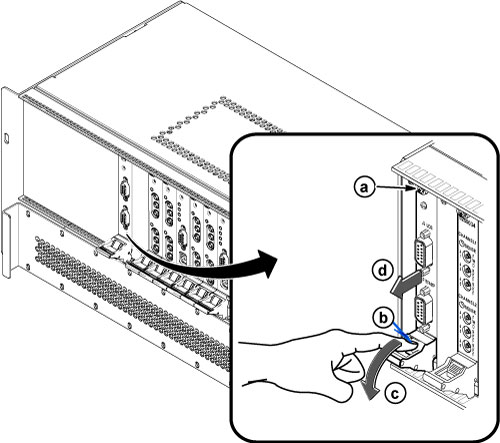
Finalization
- Restore the power. Remove LOTO from the PGR/ISC cabinet.
- Perform a UPM Calibration and Functional Check — Body Mode.
- Perform a UPM Calibration and Functional Check — Head Mode.
- Perform a check scan.