Note: Handle the fiber optic cables with care. They are very fragile.
Figure 1. DPP Rx Dist location
Table 1. Rx Dist connections
Cable
Connector
M1335
J13
M3391
J14 (Diag status)
M3375
J1 Power
P2006
J16 (DVMR Link)
M3316
J18 (Inhibit)
M1303
J12 (Loopback)
M1302
J19 (CLK Ref)
M1304
J10 (LO)
M1369
J6 (LO out)
M1368
J7 (LO out)
M1367
J8 (LO out)
M1366
J9 (LO out)
M1315
J11
M3504
J57
M3380
J58
M3371
J22
M3367
J4
M3368
J3
M3369
J2
CAUTION
Strong magnetic field
The Digitized Per Pin (DPP) Receiver Distributor (Rx Dist) has no ferrous material and will not be attracted to the magnet, but the eddy currents can cause resistance when you pull the DPP Rx Dist away from the magnet.
When removing and replacing the DPP Rx Dist, keep the receiver as far away from the magnet as possible while moving it.
Loosen four screws and remove the DPP Rx Dist.
Note: The screw holes for attaching the DPP Rx Dist are a keyhole shape or slotted so it is not necessary to remove the four screws. Just loosen them.

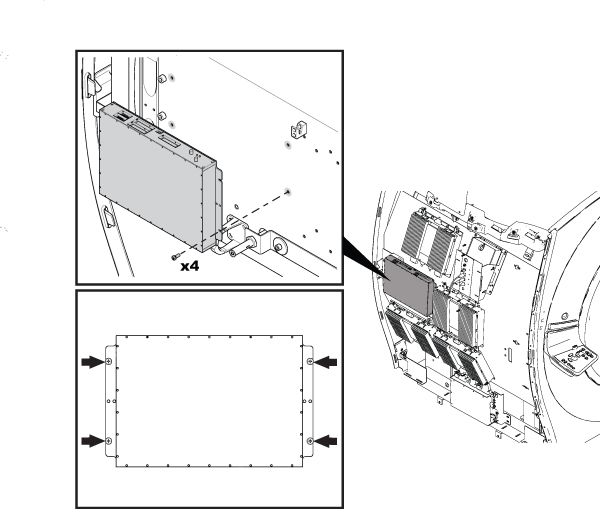
 Note: The screw holes for attaching the DPP Rx Dist are a keyhole shape or slotted so it is not necessary to remove the four screws. Just loosen them.