
- 00000018WIA3088F030GYZ
- id_123749201.6
- Nov 27, 2019 10:21:42 AM
Magnet Stud Replacement
Prerequisites
| Required persons | Preliminary requirements | Procedure | Finalization |
|---|---|---|---|
| 1 | Included in procedure | 8 hours | Included in procedure |
| Item | Quantity | Effectivity | Part number | Manufacturer |
|---|---|---|---|---|
| Wood block (for sanding) | 1 | - | - | - |
| Non-magnetic ruler | 1 | - | - | - |
| Non-magnetic tool kit | 1 | - | - | - |
| Non-ferrous safety shoes | 1 | - | - | - |
| Safety glasses | 1 | - | - | - |
| General duty gloves | 1 | - | - | - |
| DVw Stud Repair Kit | 1 | - |
5366120 | - |
| ||||||||

| Condition | Reference | Effectivity |
|---|---|---|
|
Review all safety procedures | - | - |
|
Remove magnet enclosures and end bells covering the damaged stud. | - | - |
Overview
About this task
This procedure describes the replacement of DVw mounting studs that are welded to the magnet. Studs that are threaded into blocks on the magnet are not included in this procedure. This procedure takes place in a magnetic field, and all safety aspects dealing with magnetic field procedures apply. The procedure you need to use depends on the location of the stud you are replacing. Table 5 shows the parts used in the procedures and where they apply.
| Part number | Part Name | Use |
|---|---|---|
| 5366178 | Stud Replacement Block, DVw Cylinder | Replacement Stud |
| 5366177 | Stud Replacement Block, DVw Flange | Replacement Stud |
| 5370258 | Spacer Isolation Stud Repair Kit | Spacer used for display panel only |
| 5370258-2 | Spacer Isolation Stud Repair Kit | Spacer used for side electronics only |
| 5368503 | Spacing Bar, For Side Electronics, Stud Replacement | Used for properly spacing studs for Side Electronics |
| U1-SVC-520047 | Sand Paper, 60 Grit, Pack of 10 | Used to remove paint on the magnet |
| 46-252065P158 | Tack Cloth, 18 x 36 inches, Trimaco SKU #10501 or Equal | Used to contain particles when sanding magnet |
| 5265376 | Dispenser, EPX Plus II, Applicator | Part of Epoxy kit |
| 46-252065P154 | Mixing Nozzle 9742, 3M Scotch-Weld EPX Applicator, 50 ml, PN 62974299356 | Part of Epoxy kit |
| 46-294151P60 or 46-294151P64 | Epoxy Henkel Loctite Metal Bonder In Duo-Pak Dispenser With Mixing Nozzle 50 ml Size. Date Code Requirement | Part of Epoxy kit |
| 5268439 | Shim, Power Connection Leadboard Axial Adjustment, XRMB Gradient | Used as spacers when replacing busbar studs (G10 washers) |
| 5214524-6 | Washer, M10 Large or Nordlock, A4 Stainless | Replacement Nordlock washers |
Cleaning Procedure for All Locations
About this task
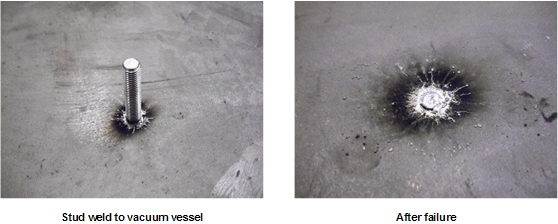
The surfaces around the broken stud on the magnet flange and the outer cylinder must be cleaned before the repair can begin. The figure below shows the area around a magnet stud.
Procedure
- There is usually some debris of weld and/or stud materials attached
to the vacuum vessel of magnet after the stud failure. To prevent
the debris falling into the magnet system, put a piece of tack cloth
(cloth coated with light adhesive to capture particles) underneath
the surface being cleaned to capture the falling debris. Clean the
area around broken stud with the tack cloth. After this step, the
large pieces of debris can be removed.
Figure 2. Stud Weld Area after Initial Debris Removal 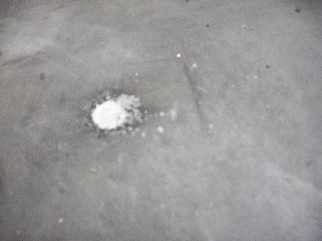
Busbar Stud Replacement
Procedure
DANGER 
Perform LOTO on the PGR PDU/gradient subsystem, and the RF amplifier and PEN cabinet (magnet room electronics). See the MR Service Safety Manual, PN 5452735.Notice - Locate the damaged stud.
Figure 3. DVw Busbar Boards 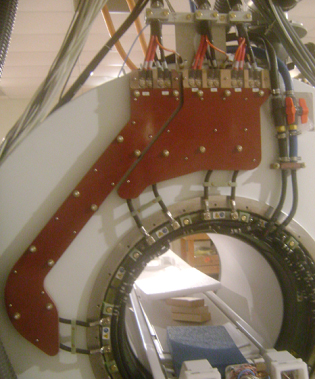
- Place a round replacement stud (5366177) into the proper location
on the busbar board. (Because the busbar board is facing downward,
the replacement stud assembly goes in stud first through the back
of the board).
Figure 4. Replacement Stud Assembly for Flanges 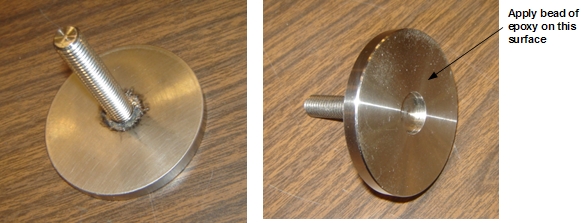
- Load an epoxy hardener cartridge into the application gun. Add
the mix nozzle to the cartridge. As the trigger is pulled, the correct
ratio of epoxy and hardener will flow out and be properly mixed in
the mixing nozzle. After mixing, the epoxy has a working life of 15
minutes.
Figure 5. Epoxy Cartridge, Mixing Nozzle, and Application Gun 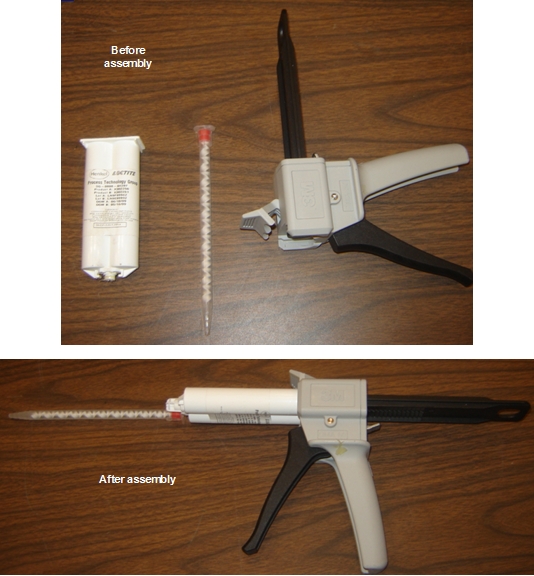
- Apply the epoxy to the mating surface of the replacement stud
assembly. Apply a 1/4 inch circular bead of epoxy on the surface.
The center area of the mating surface is provided as a relief in case
some of the original stud could not be removed in the magnetic field.
Do not apply epoxy to this region. Epoxy may flow into this region
when it spreads later in the process.
Figure 6. Epoxy Bead Application 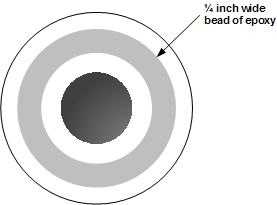
Side Electronics Stud Replacement
Procedure
DANGER
Perform LOTO on the PGR PDU/gradient subsystem, and the RF amplifier and PEN cabinet (magnet room electronics). See the MR Service Safety Manual, PN 5452735.Notice - Place the replacement stud into the spacing bar (5368503, from
Stud Repair Kit 5366120). The replacement stud assembly is made up
of a stud and 3 inch by 2 inch block. The back of the block has the
same curvature as the magnet, so the orientation of the block is critical.
The long direction of the block goes horizontally on the magnet. There
is a ←Z→ marked on the block showing
the z-direction of the magnet.
Figure 7. Replacement Stud Assembly for Side Electronics 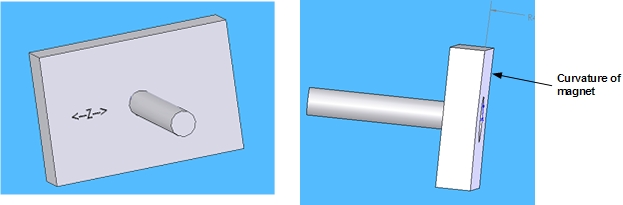
- Loosely fasten the replacement stud assembly to the bar with
G10 washers, the replacement spacer (5370258-2) and M10 nut. The replacement
stud must be located in the same position as the removed stud. The
replacement spacer is the only spacer used on the replacement stud.
The original studs reuse the original spacers.
Figure 8. Replacement Stud and Spacer 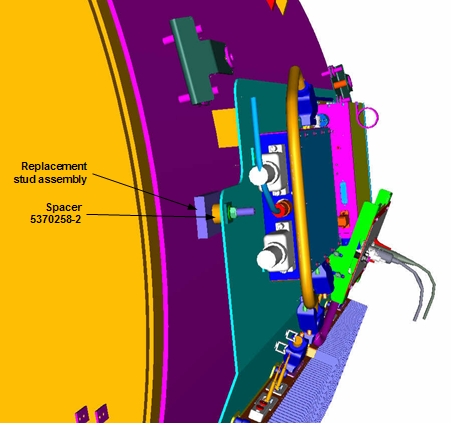
- Apply the epoxy to the mating surface of the replacement stud
assembly. Apply two 1/4 inch circular beads of epoxy on the surface.
The center area of the mating surface is provided as a relief in case
some of the original stud could not be removed in the magnetic field.
Do not apply epoxy to this region. Epoxy may flow into this region
when it spreads.
Figure 9. Epoxy Bead Application 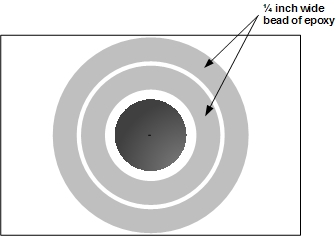
Cover/Enclosure Stud Replacement
Procedure
Perform LOTO on the PGR PDU/gradient subsystem, and the RF amplifier and PEN cabinet (magnet room electronics). See the MR Service Safety Manual, PN 5452735.DANGER - Place a replacement stud into the enclosure bracket. The stud
assembly is made up of a stud and a 3 inch by 2 inch block. The back
of the block has the same curvature as the magnet, so orienting the
block is critical. The long direction of the block orients horizontally
on the magnet. There is a ←Z→ marked
on the block showing the z-direction of the magnet.
Figure 10. Replacement Stud Assembly for Covers/Enclosures - Loosely attach the replacement stud assembly to the enclosure
bracket with a G10 washer and M10 nut.
Figure 11. Replacement Stud Assembly for Covers/Enclosures 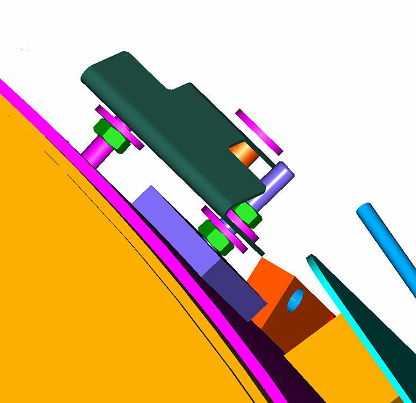
- Apply the epoxy to the mating surface of the replacement stud
assembly. Apply two 1/4 inch circular beads of epoxy on the surface.
The center area of the mating surface is provided as a relief in case
some of the original stud could not be removed in the magnetic field.
Do not apply epoxy to this region. Epoxy may flow into this region
when it spreads.
Figure 12. Epoxy Application
Body Hybrid Stud Replacement
Procedure
- Clean a 2 inch by 2 inch area around the broken stud using the
cleaning procedure in Cleaning Procedure for All Locations.Note:
The procedure for repairing damaged body hybrid studs does not use replacement stud assemblies. Instead, epoxy is applied directly to the angle bracket screwed onto the body hybrid assembly. The figure below shows how the body hybrid assembly is normally mounted.
Figure 13. Body Hybrid Studs 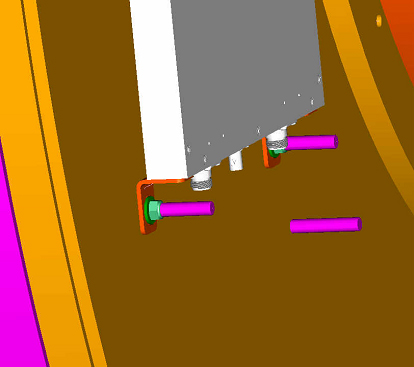
Display Panel Stud Replacement
Procedure
- Place a replacement stud (5366177) into the display frame.
Figure 14. Replacement Stud Assembly for Flanges - Apply the epoxy to the mating surface of the replacement stud
assembly. Apply a 1/4 inch circular bead of epoxy on the surface.
The center area of the mating surface is provided as a relief in case
some of the original stud could not be removed in the magnetic field.
Do not apply epoxy to this region. Epoxy may flow into this region
when it spreads later in the process.
Figure 15. Epoxy Bead Application
Finalization
Procedure
- Reinstall all enclosures and connections.
- Perform any required system tests.