
- 00000018WIA3039CE20GYZ
- id_131072543.0
- Aug 29, 2019 1:46:06 AM
ODU Connectors Cleaning and Replacement
Prerequisites
| Required persons | Preliminary requirements | Procedure | Finalization |
|---|---|---|---|
| 1 | Not Applicable | 5 mins. per connector to clean and lubricate; 30 mins. to replace | Not Applicable |
| Item | Quantity | Effectivity | Part number | Manufacturer |
|---|---|---|---|---|
| Safety Shoes | 1 pair | - | - | - |
| Safety Glasses | 1 | - | - | - |
| 2 mm Allen Wrench | 1 | - | - | - |
| Latex-free Nitrile Gloves (8 mil) | 1 pair | - |
46-194427P400 | - |
| Spindle Tip Replacement Tool Kit (includes blank P-port plug and T10 Torx bit driver) | 1 | - |
5150668-33 | - |
| Item | Quantity | Effectivity | Part number | Manufacturer |
|---|---|---|---|---|
| P-Port Spindle Lubrication Kit | 1 | - |
5150668-32 | - |
| HDv P-Port Replacement Spindle Tip Kit | 1 | - |
5150668-31 | - |
| Cotton Swabs | As required | - | - | - |
| Soft Cloths | As required | - | - | - |
| ||||
| Condition | Reference | Effectivity |
|---|---|---|
|
Order the lubricant kit prior to starting this procedure. | - | - |
ODU Connector Cleaning
About this task
The P-Port receptacle must be cleaned and lubricated on each of the system P-ports (P1 and P2 on the LPCA and P3 and P4 on the 32-channel table). Also, the coil connector must be cleaned and tested for proper fit to each P-port receptacle.
Procedure
Use the cotton swabs included in the P-Port Spindle Lubrication Kit to clean the spindle tip on the coil connector of each coil on site, removing all dirty lubricant and dust particles from the spindle tip, especially from the groove. (See the illustrations below.)Notice Figure 1. Cleaning Spindle Tip 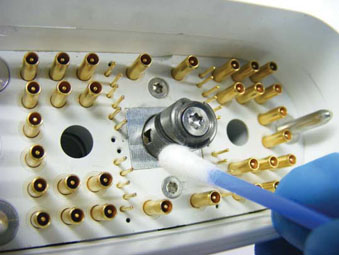
Figure 2. Cleaning Spindle Tip Groove 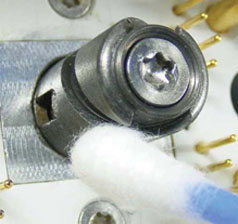
Clean and lubricate all the system P-port connectors as shown below.Notice Note:Special lubricant (included in the P-Port Spindle Lubrication Kit) and cotton swabs are required for cleaning and lubricating the P-port receptacle on the scanner.
Figure 3. Cleaning P-Port Receptacle with Cotton Swab 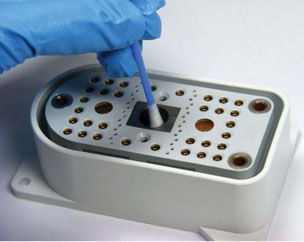
Figure 4. Lubricating with Special Syringe 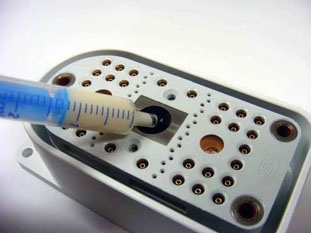
Figure 5. Location of Pins in P-Port Receptacle 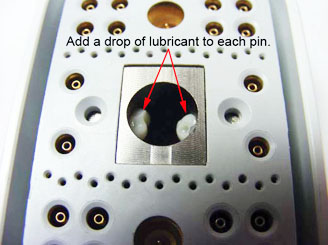
Coil Plug Connector Spindle Replacement
About this task
Follow this procedure to replace the spindle tip on the DVMR coil connector.
Procedure
- Confirm that all components (shown below) are included in the
HDv P-Port Replacement Spindle Tip Kit.Note:
Counter Sunk Screw is 8 mm long and has a red coating. A hexagonal socket is required.
Figure 6. Spindle Tip and M3 Counter Sunk Screw 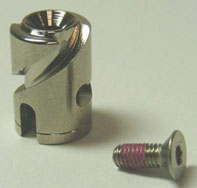
- Place the unpopulated connector found in Spindle Tip Replacement
Tool kit (5150668-33) into the coil plug connector, and rotate the
handle clockwise to lock the position as shown.
Figure 7. Placing Unpopulated Connector into Plug 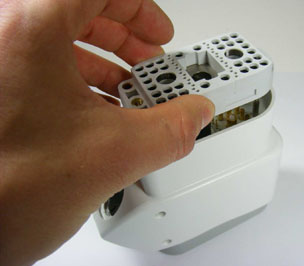
Figure 8. Rotating Unpopulated Connector to Lock in Position 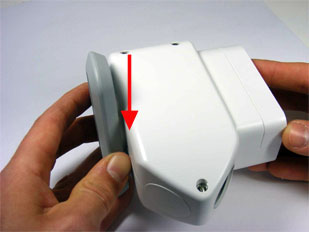
- Using the T10 Torx or a 2 mm Allen wrench, loosen the screw
on the unpopulated connector (as shown) with only one rotation counterclockwise.
Figure 9. Loosening Screw on Unpopulated Connector 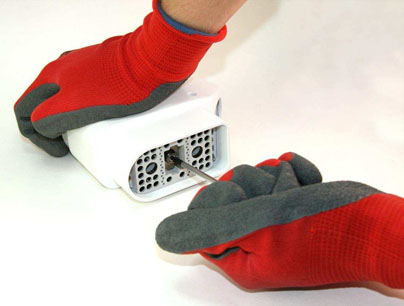
- Loosen and remove the screw from the plug using either the T10
Torx or a 2 mm Allen wrench as shown. Discard the screw.Note:
The screw from the plug must not be reused. If the screw is reused, it may loosen and the spindle may fall off.
Figure 10. Removing Screw from Plug 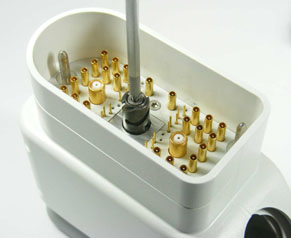
- Replace the spindle tip and the counter sunk screw, and turn
the screw using a 2 mm Allen wrench, but do not tighten.
Figure 11. Spindle Tip and Screw Replaced 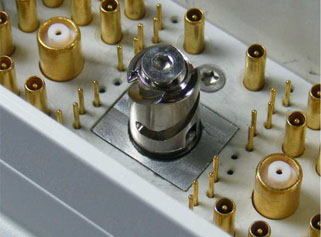
- Hand tighten the screw, and turn it an additional 1/10 turn
(1.24 Nm) with the 2 mm Allen wrench as shown.
Figure 12. Tightening Screw in Unpopulated Connector 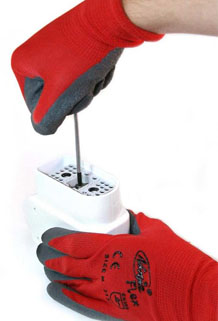
Finalization
Finalization
-
Verify that all of the customer’s coils connect properly to all of the customer's system-side connectors.
-
If you replaced a spindle, run the appropriate MCQA test for the repaired coil.