Removes the cabinet monitor from the Integrated System Cabinet (ISC).
Prerequisites
| Personnel requirements |
|---|
| Required persons | Preliminary requirements | Procedure | Finalization |
|---|
| 1 | - | 15 Minutes | - |
| Tools and test equipment |
|---|
| Item | Quantity | Part number | Manufacturer |
|---|
| Nonmagnetic Titanium Service Tool Kit, Small Set | 1 | 5113258 | - |
Procedure
- Open both doors on the ISC.
- Remove the four screws securing the top cable bracket to the ISC.
Figure 1. ISC top cable bracket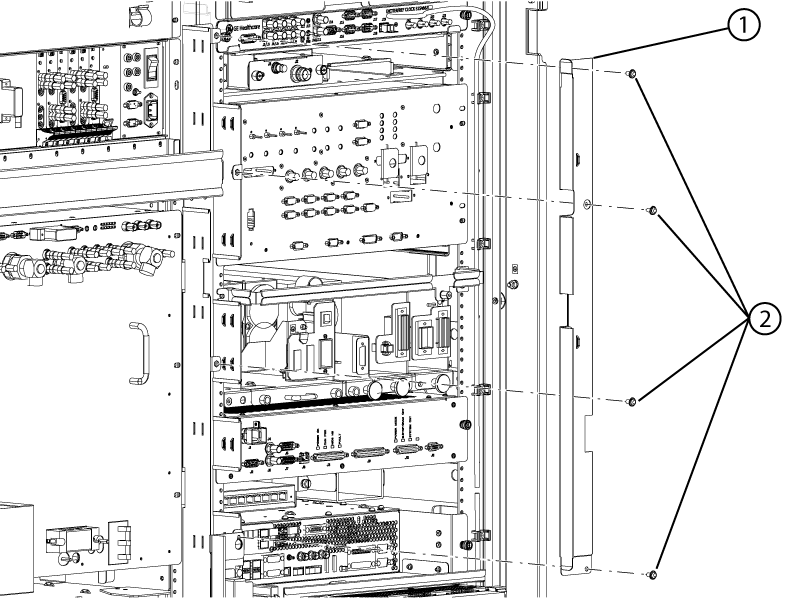
| 1 | Top cable bracket |
| 2 | Screws |
- Remove the top cable bracket from the ISC.
- Locate the cabinet monitor in the ISC.
- Disconnect all connectors from the front of the cabinet monitor.
- Move all the cables that come from the left side cable bracket away from the cabinet monitor.
- Move all the cables that are coming from the top right side away from the cabinet monitor.
- Loosen the captive fasteners securing the cabinet monitor to the ISC.
Figure 2. Cabinet monitor 3 ISR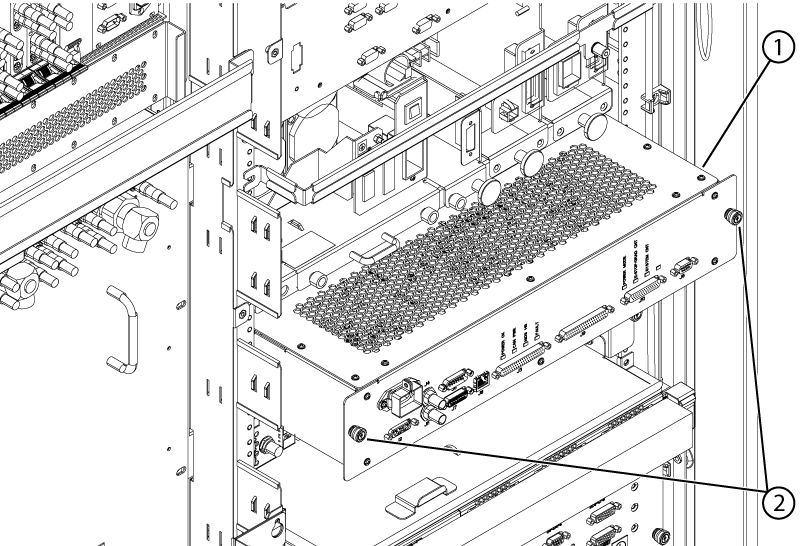
| 1 | Cabinet monitor |
| 2 | Captive fasteners |
- Remove the cabinet monitor.
