
- SIGNA™ Hero 3.0T Service Methods
- 5852800-8EN Revision 1.0
- 00000018WIA30C5C230GYZ
- id_156668131.11
- Jul 13, 2021 4:27:36 PM
Leak Sensor 2 (Tray1) Replacement
Prerequisites
| Required persons | Preliminary requirements | Procedure | Finalization |
|---|---|---|---|
| 1 | Not Applicable | 10 minutes | 15 minutes |
| Item | Quantity | Effectivity | Part number | Manufacturer |
|---|---|---|---|---|
| Standard Tool | 1 | - | - | - |
| ||||
| Condition | Reference | Effectivity |
|---|---|---|
|
System Power must be turned OFF. Refer to ISC PDU Main Breaker LOTO Procedure. | - | - |
Procedure
Notice 
Perform the following steps.Notice - Disconnect two connectors.
- Loosen three screws.
- Withdraw sensor Tray.
Figure 1. Water Tray 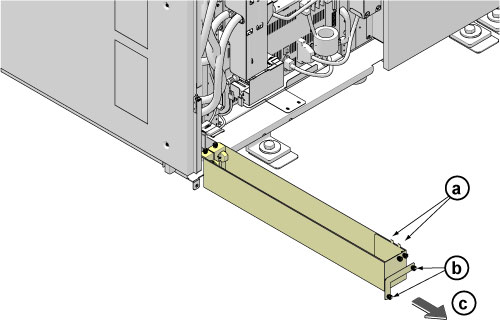
- Remove Water Tray Leak Sensor 2 Assy from the water tray by loosening 2 screws.
- Loosen two screws.
- Remove sensor.
Figure 2. Leak Sensor 2 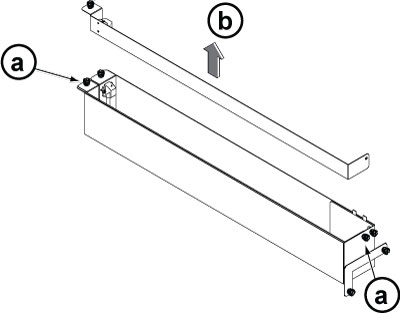
Installation is reverse order of removal.Notice
Finalization
- Restore the Power. Refer to Removing LOTO - ISC.
- Perform check scan.