- SIGNA™ Hero 3.0T Service Methods
- 5852800-8EN Revision 1.0
- 00000018WIA30E16E40GYZ
- id_20201262.9
- Feb 1, 2022 8:14:35 PM
Checking and filling hydraulic fluid
Checks and adjusts the hydraulic fluid level for the dockable patient table.
Procedure
- Drop the table into the full down position by depressing the far right pedal located at the rear of the patient table.
Figure 1. Patient transport rear pedals 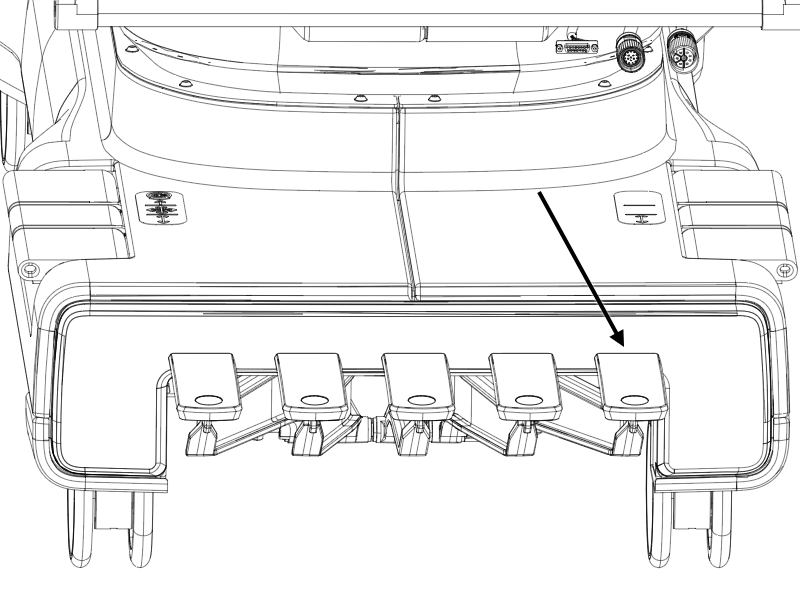
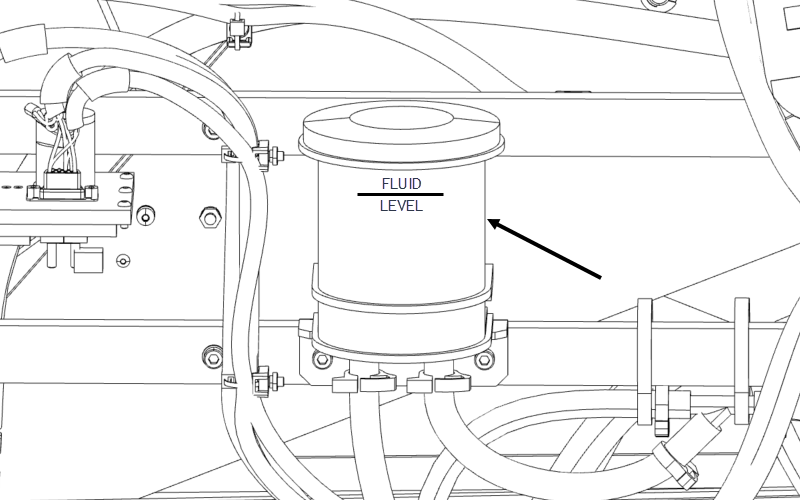
- Inspect the hydraulic fluid reservoir located at the rear of the patient table and determine if fluid needs to be added.Note: Depending on the orientation of the reservoir, the full line may be on the back side. Fluid level should be 0.25 to 0.5 inches above the full line when the table is at its lowest point.
Figure 2. Hydraulic fluid level check