- SIGNA™ Hero 3.0T Service Methods
- 5852800-8EN Revision 1.0
- 00000018WIA30B14840GYZ
- id_20148761.10
- Sep 16, 2021 10:58:44 AM
Removing the Integrated Cooling Cabinet (ICC) control unit Temperature Control Unit (TCU)
Removes either the Cabinet Cooling Unit (CCU) or Gradient Cooling Unit (GCU) Temperature Control Unit (TCU) from the Integrated Cooling Cabinet (ICC) control unit.
Prerequisites
| Personnel requirements | |||
|---|---|---|---|
| Required persons | Preliminary requirements | Procedure | Finalization |
| 1 | - | 5 minutes | - |
About this task
Procedure
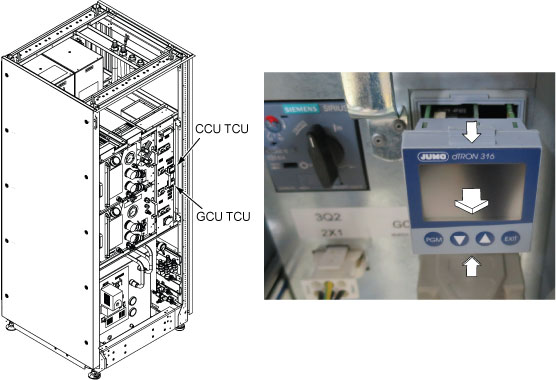
- Push both the top and bottom grip latch of the TCU and pull out the TCU.
Figure 1. TCU removal