
- SIGNA™ Hero 3.0T Service Methods
- 5852800-8EN Revision 1.0
- 00000018WIA30849230GYZ
- id_156669141.14
- Oct 24, 2021 11:13:02 PM
Air Filter Cleaning / Replacement
Prerequisites
| Required persons | Preliminary requirements | Procedure | Finalization |
|---|---|---|---|
| 1 | Not Applicable | 30 minutes | Not Applicable |
| Item | Quantity | Effectivity | Part number | Manufacturer |
|---|---|---|---|---|
| Nonmagnetic Titanium Service Tool Kit, Large Set | 1 | - | 5112581 | - |
| Item | Quantity | Effectivity | Part number | Manufacturer |
|---|---|---|---|---|
| Air Filter | 1 | - |
Refer to FRU Manual | - |
| ||||||||
Procedure
- At magnet room, loosen clamp of Air Filter and remove Air Filter for standard and remote siting configuration.
Figure 1. Air Filter Removal for standard siting configuration 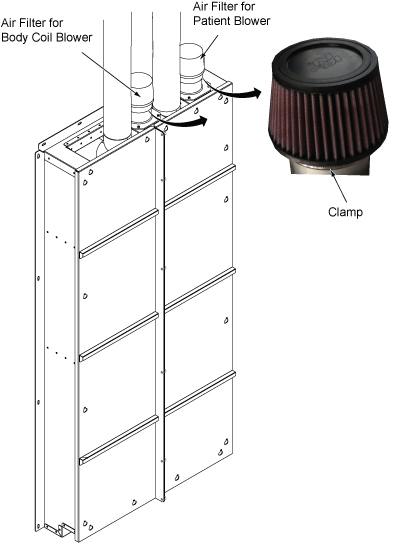
Figure 2. Air Filter Removal for remote siting configuration 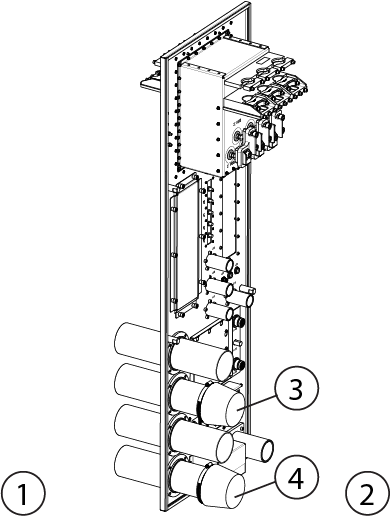
Item Description 1 Equipment Room 2 Magnet Room 3 Air Filter for Body Coil Blower 4 Air Filter for Patient Blower
Finalization
- Turn on the ISC power. Refer to Removing LOTO - ISC.
- Perform check scan.