- SIGNA™ Hero 3.0T Service Methods
- 5852800-8EN Revision 1.0
- 00000018WHA30FD62GYZ
- id_200146911.5
- Jul 13, 2021 4:16:32 PM
Shutting down the host computer
Shutting down the host computer shuts down the system safely and turns off the power to the host computer.
Procedure
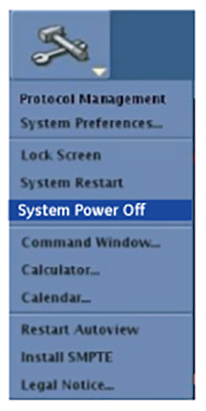
- Click System Power Off.
Figure 1. System power off