
- SIGNA™ Hero 3.0T Service Methods
- 5852800-8EN Revision 1.0
- 00000018WIA309BB230GYZ
- id_156668151.8
- Jul 13, 2021 4:27:37 PM
F50/F50SH Replacement
Prerequisites
| Required persons | Preliminary requirements | Procedure | Finalization |
|---|---|---|---|
| 1 | Not Applicable | 90 minutes | 15 minutes |
| Item | Quantity | Effectivity | Part number | Manufacturer |
|---|---|---|---|---|
| Standard Tool | 1 | - | - | - |
| Item | Quantity | Effectivity | Part number | Manufacturer |
|---|---|---|---|---|
| Towels | NA | - | - | - |
| Item | Quantity | Effectivity | Part number | Manufacturer |
|---|---|---|---|---|
| F50//F50SH | 1 | - |
Refer to FRU Manual | - |
| ||||
| Condition | Reference | Effectivity |
|---|---|---|
|
ISC Power must be turned OFF. Refer to Lockout / Tagout for ISC. | - | - |
|
F50//F50SH Power must be off at facility breaker. Refer to SRDK Cryocooler Service Manual (5351735). | - | - |
Procedure
- Remove the bottom reinforcement bar by removing 6 screws.
Figure 1. Bottom Enforcing Bar 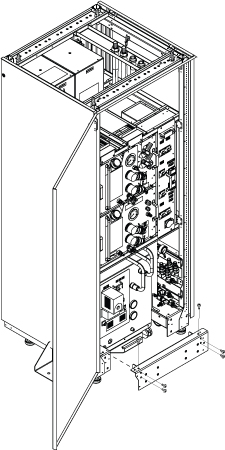
- Disconnect cables and hoses from Front Panel of F50//F50SH.
Figure 2. Hoses 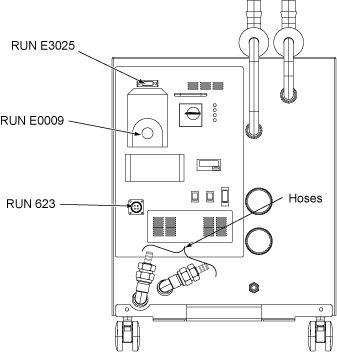
- At ICC penetration panel in Scan Room, disconnect Helium Elbow Pipe.
Figure 3. Helium Elbow Pipe 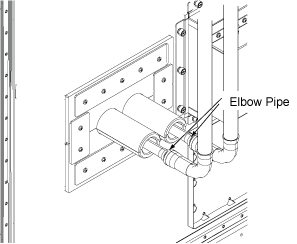
- Slide F-50 Shield/Cryo Cooler out from the lower opening of ICC.
Figure 4. Slide out F50//F50SH 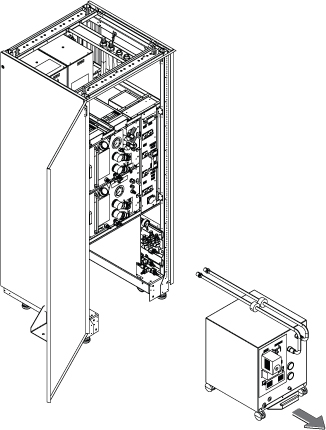
- Remove He Line Adapters long(a), He Line Adapters short(b), and Handle(c).
Figure 5. Remove extra parts 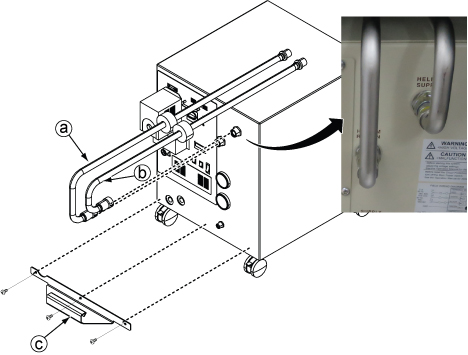
Finalization
- Open valves of Facility Water and check that there is no water leakage at the F50//F50SH water hose line.
- Turn on the F50//F50SH cryocooler and confirm that F50//F50SH and coldhead are working correctly.
- Turn on ISC Power. Refer to Removing LOTO - ISC.
- Perform check scan.