
- Discovery MR750w and SIGNA™ Architect T 3.0T System Service Methods
- 5690002-2EN Revision 4
- 00000018WIA30A3DE20GYZ
- id_131069432.0
- Feb 22, 2021 1:47:14 AM
3.0T HD 8-Channel Torso Array Coil Setup for MCQA Test
Prerequisites
| Required persons | Preliminary requirements | Procedure | Finalization |
|---|---|---|---|
| 1 | Not Applicable | 15 minutes | Not Applicable |
| Item | Quantity | Effectivity | Part number | Manufacturer |
|---|---|---|---|---|
| 3T 8-Channel Torso Phantom | 1 | Legacy Phantom Set |
2381683-3 | - |
| Torso Phantom Positioner | 1 | Legacy and Unified Phantom Set |
2381683-4 | - |
| Condition | Reference | Effectivity |
|---|---|---|
|
The coils are already preinstalled; however, the following coil configuration names are to be installed in the system to run this tool: 8US TORSOPA | - | - |
About this task
This procedure will setup for the automated MCQA test using the 3.0T HD 8-Channel Torso Coil by GE/USAI catalog M3335LN.
Note:
Coils do not ship with phantoms. Phantoms come in a unified phantom set with the MR system.
Legacy Phantom Setup
Procedure
- Note:Position the coil in the cradle, connect the cable as shown in Figure 1:
If installing the coil for the first time in a system, please refer to Auto Coil Install.
Figure 1. Connecting the Coil 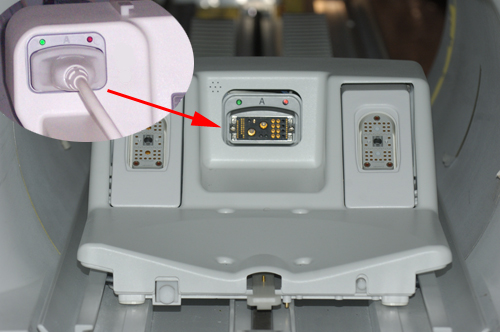
- Place phantoms and phantoms positioner in the coil as shown
in Figure 2:
Figure 2. Positioning Phantom and Positioner 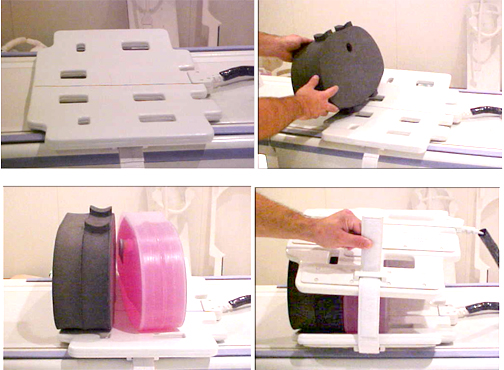
- Establish an axial landmark on the line on top of the coil.
Advance to scan. See Figure 3.
Figure 3. Landmarking Coil 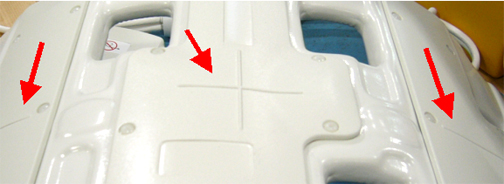
Finalization
Finalization
No finalization steps.