
- SIGNA MR355 / SIGNA MR360
- Service Manual
- 5856356-3EN Revision 5.0
- Basic Service Documentation. Copyright General Electric Company.
- 00000018WIA30992B10GYZ
- id_20068792.9
- Dec 17, 2020 2:58:38 PM
Configuring Imaging Protocol Manager (IPM)
Provides guidance on configuring the Imaging Protocol Manager (IPM) option.
Prerequisites
| Required persons | Preliminary requirements | Procedure | Finalization |
|---|---|---|---|
| 1 | Not Applicable | 1.5 hours | Not Applicable |
| Required conditions |
|---|
| MR System InSite checked out with correct model type: FE and OLC |
| MR System should have been added to IPM Cloud: Healthcare cloud admin |
| Customer should have the IPM Credentials: user ID, password and IPM configuration URL |
| Proxy IP address/port# to connect to Internet: Customer IT support |
| Domain Name Service (DNS) Server IP addresses, if applicable: Customer IT support |
| SSL certificates related information from customer IT in case such a security protocol is used at site |
| Safety |
|---|
|
Before working in any GE Healthcare MR suite or performing any GE Healthcare service procedure, you must:
If you have any safety concerns at any time, do not begin work or immediately stop work and move to a safe location. Immediately contact your supervisor or site safety officer for instructions on how to proceed. |
About this task
- MR System: This manual covers the procedures performed on the MR scanner to connect it to the IPM application on the cloud
- IPM application: Imaging Protocol Manager Service Manuals cover procedures performed on the IPM application to connect it to the MR scanner. Search in the SIMS Content Viewer for these documents: DOC2090972 for UOM deployments; DOC2432496 for IDAM deployments.
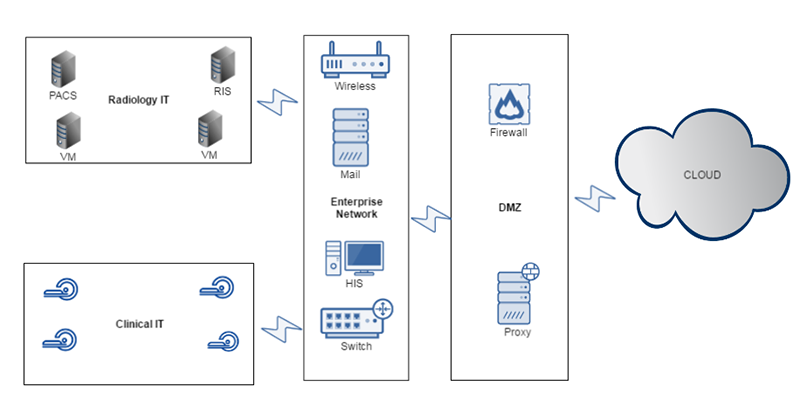
Protocol import/export criteria
Only site protocols are available to be exported or imported through the IPM application. The whole protocol (directory) is considered as a unit and is transferred during the pull/push operation. Embedded images in protocol notes are also transferred as part of the protocol.
Compatibility checkers on the cloud and on the device check equality for fields such as grad coil and field strength before pushing and committing the protocol. When a new protocol from the device is imported into IPM on the cloud, it is assigned a unique identifier based on the timestamp and its MAC address. When a protocol is sent to the device from IPM, it also is given a unique identifier. The scanner must be InSite checked out to enable registering with the cloud.
- Register: Registers scanners into the organization registry.
- Pull: Imports protocols to the cloud library from multi-modality scanners (CT or MR) and allow basic editing.
- Publish: Views protocol(s) and publishes them as Published Protocol for the fleet of same scanners.
- Distribute: Distributes protocols to scanners throughout the hospitals within the organization.
To verify that you are connected, go to Check scanner-IPM network connectivity.