- SIGNA MR355 / SIGNA MR360
- Service Manual
- 5856356-3EN Revision 5.0
- Basic Service Documentation. Copyright General Electric Company.
- 00000018WIA30B92B10GYZ
- id_20068812.4
- Jan 8, 2021 11:28:13 AM
Doing the Imaging Protocol Manager (IPM) diagnostic
Check the status of the Imaging Protocol Manager (IPM) application.
Purpose
- Shows the application connectivity status and the status of protocols sent, received, and committed along with its last updated time.
- Provides an option to run diagnostics, which completes pre-defined diagnostic tests including the proxy connection test, the internet connection test, the polling test, heartbeat test, and others.
Procedure
- Launch CSD.
- Click the Configuration tab.
- Click Imaging Protocol Manager (IPM).
- Click the Diagnostics tab.
Figure 1. Diagnostics window 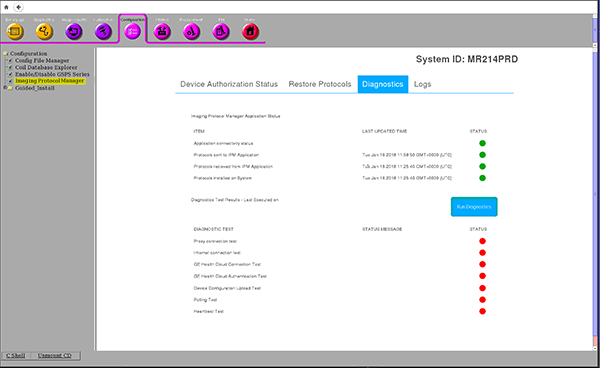
- Click Run Diagnostics to run the predefined tests. The window showing the in-progress tests appears.
Figure 2. Run Diagnostics window 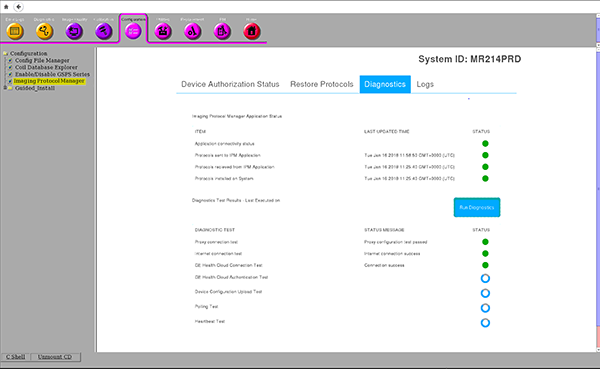
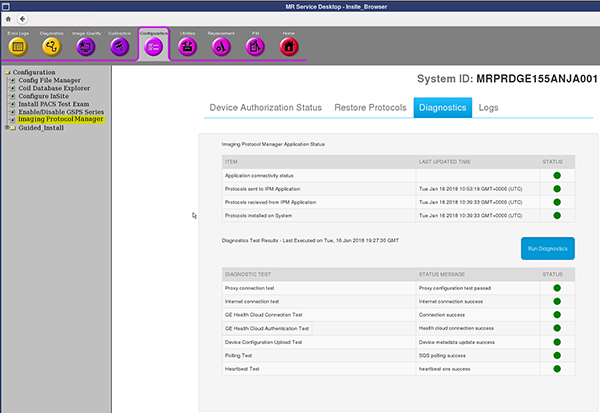
- After the diagnostics are complete, the window updates the status with either green (done) or red (not done) icons against each test.
Figure 3. Diagnostic test status