
- SIGNA MR355 / SIGNA MR360
- Service Manual
- 5856356-3EN Revision 5.0
- Basic Service Documentation. Copyright General Electric Company.
- 00000018WIA30D1FF20GYZ
- id_131066691.3
- Jul 6, 2019 12:03:29 AM
Actuator
Prerequisites
| Required persons | Preliminary requirements | Procedure | Finalization |
|---|---|---|---|
| 1 | 0 minutes | 120 minutes | 0 minutes |
| Item | Quantity | Effectivity | Part number | Manufacturer |
|---|---|---|---|---|
| Spanners (1/2,3/4,3/8,7/16,5/16,32) | One for each size | - | - | - |
| Circlip inserter (A-150,A170) | One for each size | - | - | - |
| Hex. Socket (9/16,3/4,3/8) | One for each size | - | - | - |
| Scale (15cms & 30 cms) | One for each size | - | - | - |
| Ball driver (5/32,5/64,3/32,1/8,7/64,9/16) | One for each size | - | - | - |
| Allen key (5/32,5/64,3/32,1/8,7/64,9/16) | One for each size | - | - | - |
| Flat nose plier | - | - | - | - |
| Cutter | - | - | - | - |
| Copper hammer | - | - | - | - |
| Screw driver (8mm, 4mm) | One for each size | - | - | - |
| Knife | - | - | - | - |
| Soft mallet | - | - | - | - |
| Torque wrench (40-120 kg-cm,10 –50 lb-ft) | - | - | - | - |
| Item | Quantity | Effectivity | Part number | Manufacturer |
|---|---|---|---|---|
| Locktite / Primer (242, 569, 680, 415, 770) | One for each size | - | - | - |
| IPA | - | - | - | - |
| White Marker | - | - | - | - |
| Grease Mobil HSC 32 | - | - | - | - |
| Cotton waste White (High grade) | - | - | - | - |
| Item | Quantity | Effectivity | Part number | Manufacturer |
|---|---|---|---|---|
| Refer to Low Height Fixed Table FRU Manual | 1 | - | - | - |
| ||||||||
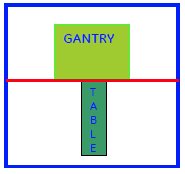
Procedure
- Disassemble base covers, all scissor covers, rear support.
Figure 1. Disassemble base covers, all scissor covers, rear support 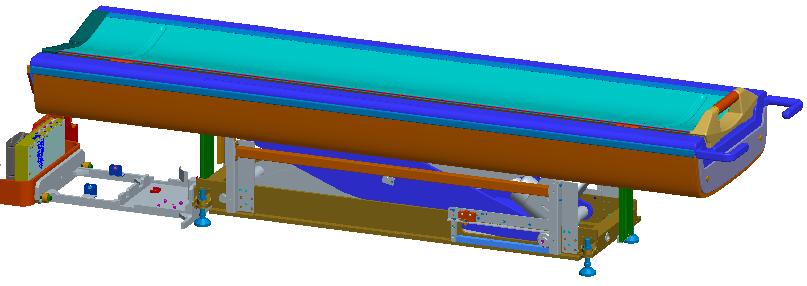
- Disconnect cables in dock frame area, disconnect table with
dock frame.
Figure 2. Disconnect cables in dock frame area, disconnet table with dock frame 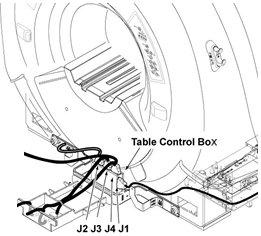
- Install casters, lower leveling pads if necessary, heighten
leveling pads after casters are installed. Move the table out of bay.
Figure 3. Install casters, lower leveling pads if necessary, heighten leveling pads after casters are installed. Move the table out of bay 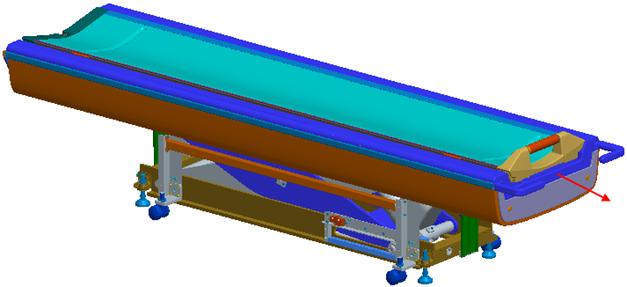
- Use screw rod to support.
Figure 4. Use screw rod to support 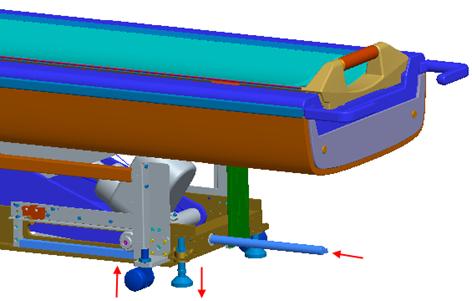
- First disconnect bottom actuator pin, then disconnect top pin.
Figure 5. Disconnect bottom actuator pin 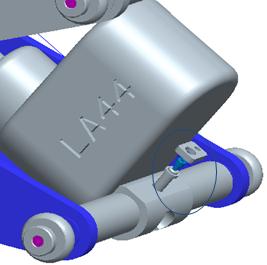
Figure 6. Disconnect top pin 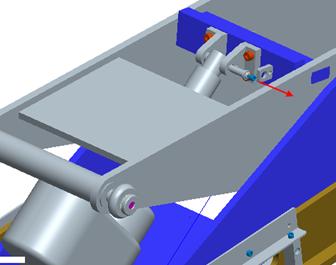
- First install bottom pin, then top pin.
Figure 7. Install bottom pin 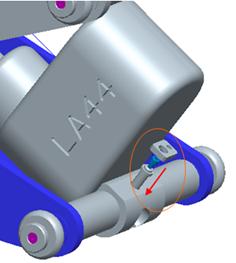
Figure 8. Install top pin 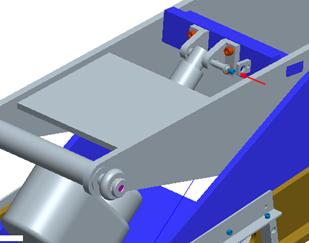
- Install mid scissor covers, then top scissor covers, ensure
min. 3mm gap.
Figure 9. Install mid scissor covers 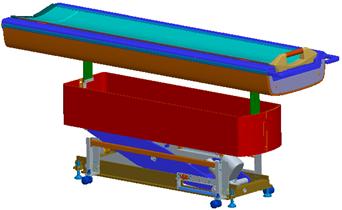
Figure 10. Install top scissor covers 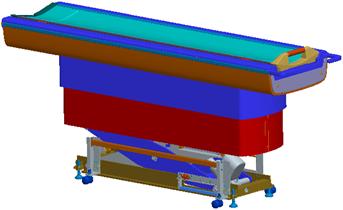
Figure 11. Ensure min. 3mm gap 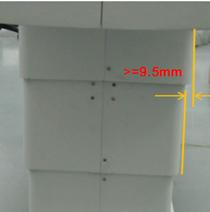
- Heighten leveling pads, lower casters to topmost position, push
table back to bay.
Figure 12. Heighten leveling pads, lower casters to topmost position, push table back to bay 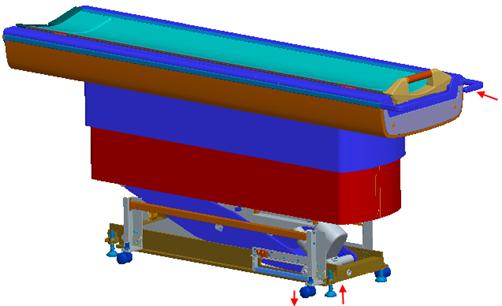
Finalization
- Turn the system power ON. Refer to Lockout / Tagout for System Cabinet PDU Main Breaker.
- Level the Table and perform Height Adjustment. Refer to LEVELING FIXED TABLE and TOP HEIGHT ADJUSTMENT.
- Fix the FRP Covers of the Table.
- Perform CRADLE HOME SENSOR CHECK .
- Check the Table Function. Refer to TABLE CHECKS AFTER INSTALLATION .
- Perform Express Coil MCQA Test to check that the PA coil cable is properly connected.