- id_12373505
- Version: 1.2
- Date: Jul 5, 2019 10:03:33 PM
HP 8400 Ethernet Switch Replacement
Prerequisites
| Required persons | Preliminary requirements | Procedure | Finalization |
|---|---|---|---|
| 1 | Not Applicable | 15 minutes | 5 minutes |
| Item | Quantity | Effectivity | Part number | Manufacturer |
|---|---|---|---|---|
| Standard Screwdriver | 1 | - | - | - |
|


Procedure
- Close the application software on the host computer. Perform LOTO on the power sources. See the MR Service Safety Manual, PN 5452735.
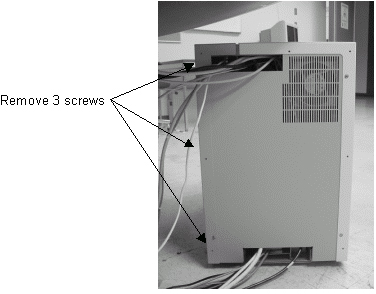
- Remove the three screws at the rear of the GOC that secure the
right side panel.
Figure 1. Removing Screws
- Remove the right panel of the GOC, and disconnect the ground
lead that connects the cover to the main chassis.note:
Avoid straining the short ground lead.
- Disconnect the power cord from the Ethernet switch.
- Remove all cables connected to the Ethernet switch, and make
a note of the labeling for reconnection.
Figure 2. Removing Cables
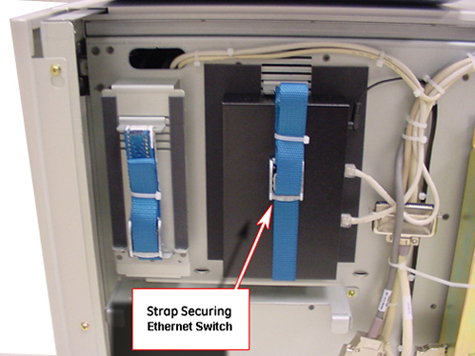
- Loosen the strap that secures the Ethernet switch (shown above) and carefully remove it.
- Install the replacement Ethernet switch by reversing the above steps.
Finalization
- Restore power to the GOC and reboot the computer.
- Perform a test scan to ensure proper operation.