- id_12373632
- Version: 1.7
- Date: Jul 5, 2019 10:03:32 PM
HP 8400 Computer Replacement
Prerequisites
| Required persons | Preliminary requirements | Procedure | Finalization |
|---|---|---|---|
| 2 | Not Applicable | 120 minutes | 30 minutes |
| Item | Quantity | Effectivity | Part number | Manufacturer |
|---|---|---|---|---|
| Screwdriver set | 1 | - | - | - |
| Item | Quantity | Effectivity | Part number | Manufacturer |
|---|---|---|---|---|
| HP XW8400 PC | 1 | - |
See the FRU manual. |
- |
|


| Condition | Reference | Effectivity |
|---|---|---|
|
Host computer and GOCAA must be powered off. |
- | - |
Procedure
- Request that the customer archives all images to an external storage device (for example PACS, DVDs, etc.).
- Perform the SaveInfo procedure.
- Shut down all system applications that are still running. Turn
off power to the PDU. See the MR Service Safety Manual, PN 5452735.note:
If the optional GOC UPS accessory is installed, use extra caution when powering down.
- Remove the two screws on the side securing the left side panel.
- Remove the left side panel by lifting it up.note:
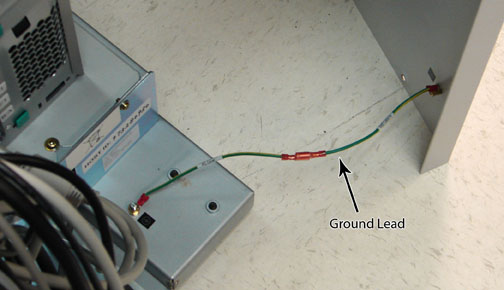
The side panel has a short ground lead connecting it to the main chassis. When removing the side panel, do not strain this ground lead.
Figure 1. Ground Lead Location
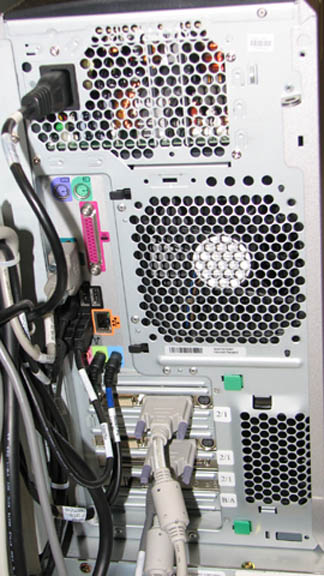
- Remove all the cables connected to the computer, ensure they
are properly labeled, and note their locations for reattachment.
Figure 2. HP 8400 Cable Configuration
- Remove the screws, brackets and/or straps that secure the PC to the GOC frame.
- notice
- Carefully remove the PC from the GOC.
- Remove the sled from the PC, and install it on the new unit.
- Perform a disk wipe on all applicable hard drives in the old PC. See the latest revision of the Disk Management Tool Service Manual, PN 5500610-1EN available from the online documentation library.
- Install the new PC, and secure it to the bottom and rear brackets.
 |
Finalization
- Remove LOTO from the PDU.
- Restore power to the GOC, boot the software, and ensure proper
system operation.
note:
If necessary, reconnect the optional UPS and ensure that power is restored.
- Perform the applicable Loading Host System Software procedure to load software and applications onto the operating system.
note:
Load from Cold (LFC) must be performed to properly transfer customer options.
- Update the eLicense with the new Host ID.
- Repackage the defective PC for return.
- Perform a scan to ensure that the system and applications are working properly.
- Perform a SaveInfo to save system data for future operations.