
- 00000018WIA30EAF030GYZ
- id_123749261.7
- Jul 5, 2019 10:03:33 PM
Transient Detection Module (TDM) Replacement
Prerequisites
| Required persons | Preliminary requirements | Procedure | Finalization |
|---|---|---|---|
| 1 | Not Applicable | 30 minutes | 30 minutes |
| Item | Quantity | Effectivity | Part number | Manufacturer |
|---|---|---|---|---|
| Non-Magnetic Service Tool Kit | 1 | - |
5112581 | - |
| Item | Quantity | Effectivity | Part number | Manufacturer |
|---|---|---|---|---|
| Transient Detection Module (TDM) | 1 | - |
Refer to FRU Manual | - |
| ||||
Removing TDM
Procedure
- Remove the left side middle and left side rear covers to access
the TDM. See Side and Top Cover Removal and Installation.
Figure 1. TDM with Side Cover Removed 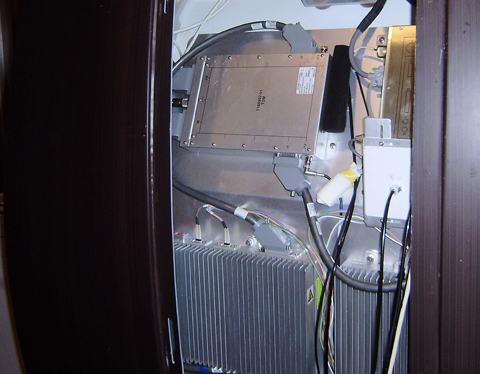
- Disconnect all cables connected to the TDM.Note:
Remove J1 before you remove J12 in order to prevent damage to the end of the cable connected to J12.
Figure 2. TDM Cable Connections 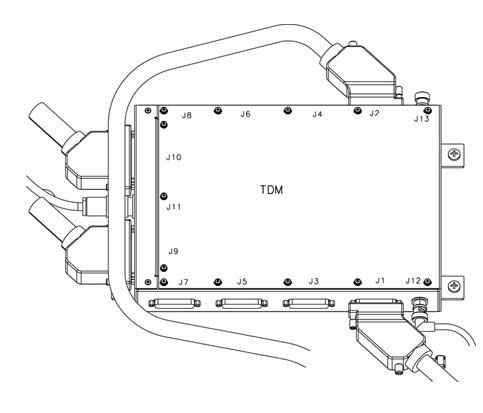
- Remove the four screws holding the TDM to the magnet.
Figure 3. Remove TDM Screws 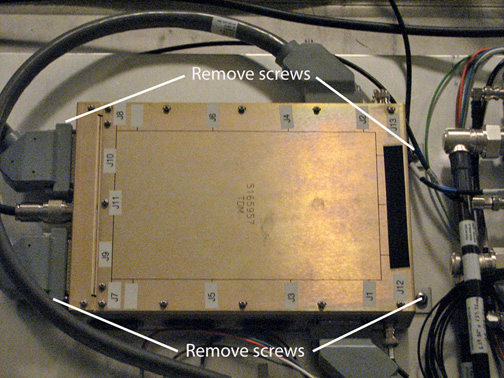
While carrying the module out of the magnet room, stay as far away from the magnet as possible.CAUTION 
Installing TDM
Procedure
While carrying the module into the magnet room, stay as far away from the magnet as possible.CAUTION
Finalization
Procedure
- Run TNS Datapath Diagnostics to confirm there are no remaining issues.
- Run a test scan to make sure the system is functional. See Check Scan.