
- SIGNA™ Hero 3.0T Service Methods
- 5852800-8EN Revision 1.0
- 00000018WIA309D5110GYZ
- id_20038562.3
- Oct 12, 2021 3:40:21 PM
Doing the ambient temperature sensor replacement
After completing the tasks for the required conditions, replace the ambient temperature sensor.
About this task
Procedure
- Disconnect the ambient temperature sensor cable from the M3350 cable.
Figure 1. Ambient temperature sensor 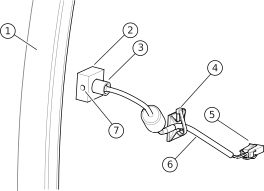
1 Right center cover 2 Port hole block 3 Ambient temperature sensor 4 Tie wrap 5 Connector to M3350 cable 6 Ambient temperature sensor cable 7 Set screw