• SIGNA MR355 / SIGNA MR360
  • Service Manual
  • 5856356-3EN Revision 5.0
  • Basic Service Documentation. Copyright General Electric Company.
  • Object ID: 00000018WIA30DD1030GYZ
  • Topic ID: id_13106774 Version: 1.1
  • Date: Jul 6, 2019 12:17:32 AM

Slice Offset Checks

Prerequisites

Table 1. Personnel requirements
Required personsPreliminary requirementsProcedureFinalization
1Not Applicable30 minutesNot Applicable
Table 2. Tools and test equipment
ItemQuantityEffectivityPart numberManufacturer
Head Axial Slice Analysis Phantom1-

46-287379G1

-

About this task

Slice offset is determined by performing a multiscan sequence on the Head Axial Slice Analysis Phantom, and imaging between the slice thickness plates. There are two ramps inside the phantom that extend between the three plates. The ramps originate at the center of the center plate and rise at an angle of 63.4°. The offset between the image slices is calculated by measuring the length of the ramp image.

Note:

It is important that the correct Head Axial Slice Analysis Phantom, 46-287379G1, is used in this procedure. Other Head Axial Slice Analysis Phantoms will not give the correct results.

2D SCANS

Procedure

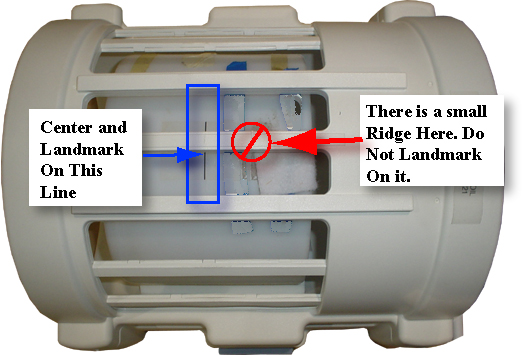
  1. Place the Axial Slice Analysis Phantom in the head coil. Position the filler plugs (resolution end of the phantom) toward the foot-end of the table. Landmark the phantom on the center line.
    Figure 1. AXIAL SLICE ANALYSIS PHANTOM POSITIONING
  2. At the keypad on the front magnet enclosure, press LANDMARK and MOVE TO SCAN.
  3. At the operator workspace, select the Scan icon in the desktop control panel, if you have not already done so.
  4. Click on Autoview, just below the Autoview image display screen; your images will be automatically displayed.
  5. At the operator workspace, prepare the system for a Slice Offset Series 1 scan using the "Service Protocols".
  6. Press MOVE TO SCAN button on the operator workspace, then click on Scan (system Auto Prescans first).
  7. After scan #1 is complete, click on New Series. Prepare scan #2 (Slice Offset Series 2 scan, 2D -50mm Table Delta).
  8. Press the MOVE TO SCAN button on the operator workspace, then click on Scan (system Auto Prescans first).
  9. For analysis, refer to SLICE OFFSET IMAGE ANALYSIS.

3D SCANS

Procedure

  1. After Scan #2 is complete, click on New Series. Prepare Scan #3 (Slice Offset Series 3 scan, 3D GRE Localizer).
  2. Press the MOVE TO SCAN button on the operator workspace, then click on Scan (system Auto Prescans first).
  3. After Scan #3 is complete, click on New Series. Prepare Scan #4 (Slice Offset Series 4 scan, 3D GRE 50mm Table Delta).
  4. Click on the Graphic Rx window.
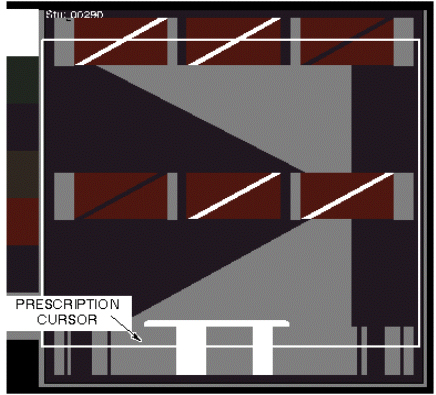
  5. A slab box cursor appears on the image. Position the cursor over the center bar of the image (see Figure 2), then click on Accept, Save Series. Then Prepare to Scan.
    Figure 2. CURSOR PLACEMENT FOR PRESCRIBING SLICE OFFSET 3D SCAN
  6. Press the MOVE TO SCAN button at the operator workspace, then click on Scan (system Auto Prescans first).
  7. After Scan #4 is complete, click on [New Series]. Prepare Scan #5 (Slice Offset Series 5 scan, 3D GRE -50mm Table Delta).
  8. Press MOVE TO SCAN button at the operator work space, then click on Scan (system Auto Prescans first).
  9. For analysis, refer to SLICE OFFSET IMAGE ANALYSIS.
    Note:

    Image annotation is relative to original landmark; images are always annotated "I 50", "S 50" for all offset image pairs.

SLICE OFFSET IMAGE ANALYSIS

Procedure

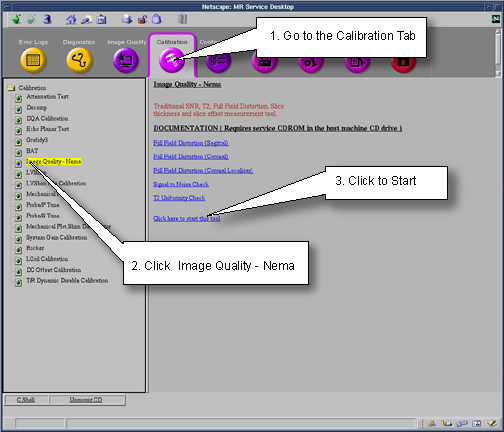
  1. To run the Image Quality Analysis – NEMA tool from the Service Desktop, follow the instructions on Figure 3, below.
    Figure 3. STARTING THE IMAGE QUALITY - NEMA TOOL FROM THE SERVICE BROWSER
  2. For TwinSpeed, highlight the same GradMode that was used with sections 2D SCANS and 3D SCANS above, then click on OK.
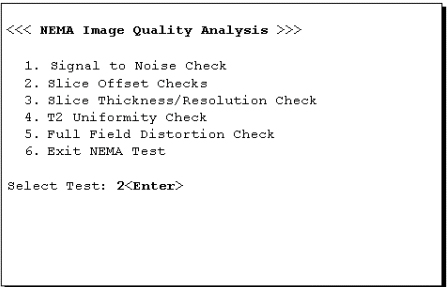
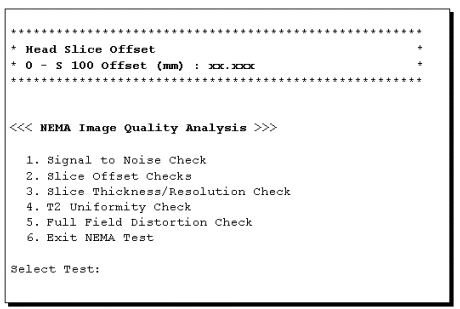
  3. A NEMA Image Quality window appears on the desktop. Type 2Enter for Slice Offset Checks. See Figure 4.
    Figure 4. NEMA IMAGE QUALITY MENU
  4. Enter the first image exam, series, and image numbers.
    Note:

    Select the slices nearest I = 50 mm and S = 50 mm when performing the analysis on the 3D scan images.

  5. Enter the second image series and image numbers. The second image Exam Number should be the same as the first image.
    Note:

    Select the slices nearest I = 50 mm and S = 50 mm when performing the analysis on the 3D scan images.

  6. Analysis then begins. The final values are displayed on the screen, as shown in Figure 5.
    Figure 5. SLICE OFFSET RESULTS SCREEN
  7. Record the Measured Offset in Data Sheet 1, Head Slice Offset Data. For TwinSpeed, identify the GradMode used.
  8. Repeat steps Step 3 through 7 above for analysis of the remaining images.
  9. Type 6 and press Enter to exit the NEMA Image Quality Analysis Menu.

Finalization

Procedure

  1. Return the system to a patient scanning condition.
  2. Do a check scan to insure proper operation.