
- SIGNA MR355 / SIGNA MR360
- Service Manual
- 5856356-3EN Revision 5.0
- Basic Service Documentation. Copyright General Electric Company.
- 00000018WIA30AA4F20GYZ
- id_131062692.0
- Jul 19, 2019 10:59:01 AM
Emergency Stop and Off Check
Overview
The document provides the procedure for checking:
-
The EMERGENCY STOP function of the Power Distribution Unit (PDU) for the Gradient cabinet, RF cabinet, System cabinet and magnet enclosure
-
The EMERGENCY OFF function of the power for the entire system.
The PDU EMERGENCY STOP buttons are located on the SCIM Keyboard and on the Magnet Enclosure front cover (two buttons, left and right).
An EMERGENCY OFF button is located on the System Main Disconnect Panel. The other EMERGENCY OFF buttons are located by the customer.
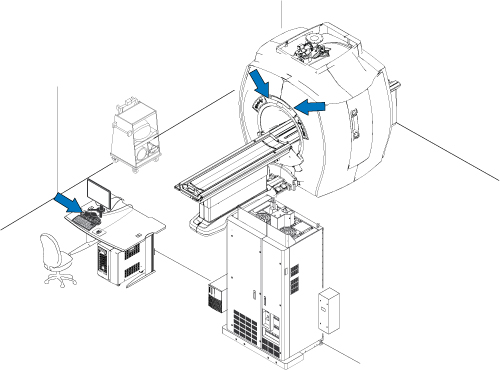
System Shutdown
Shut down the LINUX PC by going to the Service Desktop, clicking on System Shutdown, and confirming the operation.
Emergency Stop
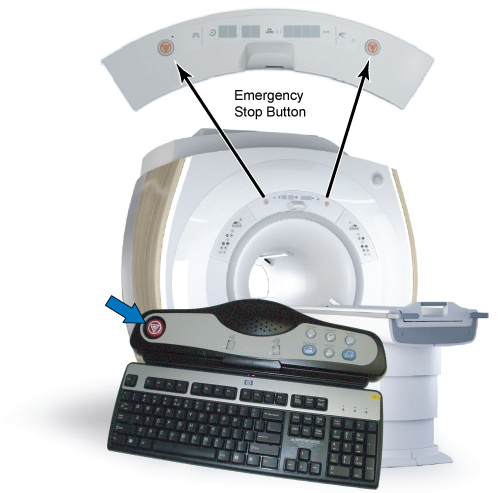
-
Press one of the EMERGENCY STOP buttons as shown in Figure 2.
-
Verify the power to the Gradient subsystem and RF subsystem is shut off by checking that the cabinet cooling fans have stopped. Also, verify that the Display LEDs on the Magnet Enclosure are not illuminated.
Note:Activation of the Emergency Stop Button for System Cabinet will remove the high voltage power from the gradient driver, so there will be no gradient power output to the body coil. However, be aware that the low voltage power will stay enabled in the System cabinet after the Emergency Stop Button is pressed. This low voltage power remains on so the System will be ready for scanning when full power is restored.
-
On the PDU, press the EMO Reset Button to return power to all effected cabinets. See Figure 3 for System Cabinet.
-
Repeat steps 1 through 3 for each of the other EMERGENCY STOP buttons.
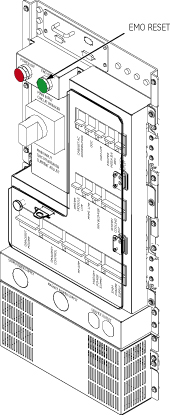
Emergency Off
The AC power for the Shield/Cryo-Cooler compressor and the Magnet Monitor are not controlled by the Emergency Off button.
-
Press one of the EMERGENCY OFF buttons (the location of buttons is determined by the customer).
-
On the System Main Disconnect Panel, press the PDU POWER ON button. The rest of the system should automatically power on.
-
On the PDU, press the EMO RESET button.
-
Repeat steps 1-3 for the other EMERGENCY OFF buttons.