
- SIGNA MR355 / SIGNA MR360
- Service Manual
- 5856356-3EN Revision 5.0
- Basic Service Documentation. Copyright General Electric Company.
- 00000018WIA30561030GYZ
- id_131072931.1
- Jul 5, 2019 10:46:05 PM
Patient Communication Box
Prerequisites
| Required persons | Preliminary requirements | Procedure | Finalization |
|---|---|---|---|
| 1 | Not Applicable | 30 minutes | Not Applicable |
| Item | Quantity | Effectivity | Part number | Manufacturer |
|---|---|---|---|---|
| Non Magnetic Tool Set | 1 | - | - | - |
| Item | Quantity | Effectivity | Part number | Manufacturer |
|---|---|---|---|---|
| Patient Communication Box (Refer to Illustrated Parts) | 1 | - | - | - |
| ||||||||

| Condition | Reference | Effectivity |
|---|---|---|
|
System Power must be turned OFF. Refer to Lockout / Tagout for 1.5T System Cabinet PDU Main Breaker. | - | - |
Procedure
- Remove 2 screws and remove patient communication box with bracket.
Figure 1. Patient Communication Box 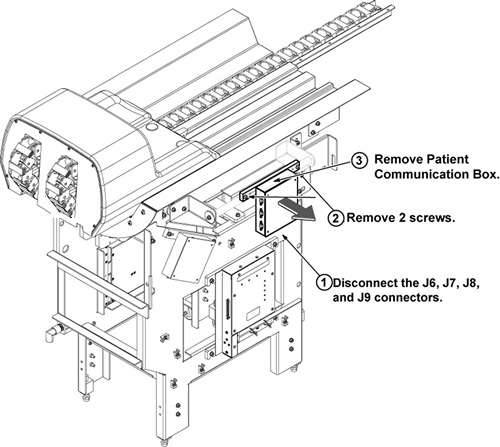
Finalization
- Restore the Power. Refer to Lockout / Tagout for 1.5T System Cabinet PDU Main Breaker.
- Check intercom function. Basically, intercom adjustment of GOC Audio Box is not required. If necessary, perform Intercom Adjustment for Simple OC Audio Box as troubleshooting.