
- Optima MR450w BASE 1.5T System Service Methods
- 5690012-2EN Revision 3
- 00000018WIA30D54630GYZ
- id_20113756.0
- Feb 26, 2021 2:46:29 AM
Removing the Image Compute Node (ICN) Solid State Drive (SSD)
Remove the Image Compute Node (ICN) solid state hard drive (SSD).
Prerequisites
Notice: Do not cycle ICN power using the power button on the front of the ICN. This could corrupt the ICN hard drive.
| Personnel requirements | |||
|---|---|---|---|
| Required persons | Preliminary requirements | Procedure | Finalization |
| 1 | - | 15 minutes | - |
Procedure
- Press the orange circle on the left front of the ICN to release the front lever. Pull on the front lever to eject the drive.Important: Do not remove the replacement drive from its static sensitive packaging until it is needed.
Figure 1. Eject the drive 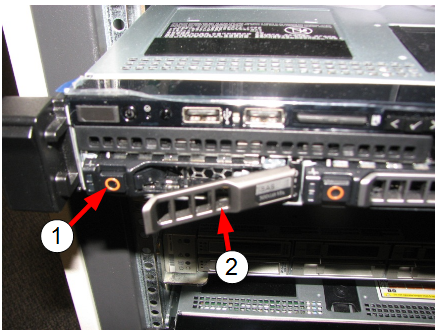
1 First orange circle (press to remove the hard drive). The orange circle on the right opens the gate for access to the solid state device. Do not open during this procedure.
2 Front lever