
- Optima MR450w BASE 1.5T System Service Methods
- 5690012-2EN Revision 3
- 00000018WIA30B9E030GYZ
- id_123737671.7
- Feb 26, 2021 5:28:19 PM
ICN Hard Drive/SSD Replacement (Dell R620 and R630)
Prerequisites
| Required persons | Preliminary requirements | Procedure | Finalization |
|---|---|---|---|
| 1 | 10 minutes | 30 minutes | 30 minutes |
| Item | Quantity | Effectivity | Part number | Manufacturer |
|---|---|---|---|---|
| ICN Hard Drive | 1 | Dell R620 |
See FRU manual. | - |
| ICN SSD | 1 | Dell R630 |
See FRU manual. | - |
| ||||||||

About this task
Overview
This procedure documents the processes for the following:
-
Replacing the hard drive in the Dell R620 ICN
-
Replacing the SSD in the Dell R630 or R640 ICN
| ICN Type | Part Number Series |
| R620 (Gen 5) | 5921000x |
| R630 (Gen 6) | 5931000x |
Procedure
- Press the orange circle on the left front to release the front
lever. Pull on the front lever to eject the drive.
Figure 1. 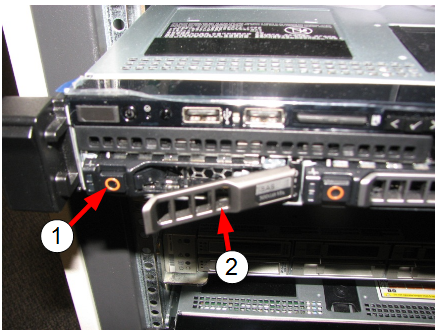
Item Description 1 (For R620 and R630) Orange circle (press to remove hard drive/SSD)
(For R620) The orange circle on the right opens the gate for access to the solid state device. Do not open during this procedure.
2 Front lever
Remove the new drive from the static-sensitive packaging and insert into the ICN.Notice 
Finalization
- Turn on the ICN. See ICN On/Off Procedure.
Note:
For the first three or four minutes, the LEDs illuminate only at the rear of the ICN, next to the power cables. After three to four minutes, the ICN fans are audible and the LED on the front of the ICN starts flashing.
- Configure the new hard drive/SSD, using VRE Reconfiguration.
- Perform Check Scan.