
- Optima MR450w BASE 1.5T System Service Methods
- 5690012-2EN Revision 3
- 00000018WIA30481E20GYZ
- id_131064745.0
- Feb 21, 2021 9:07:57 PM
KASC assembly replacement
Prerequisites
| Required persons | Preliminary requirements | Procedure | Finalization |
|---|---|---|---|
| 1 | Not Applicable | 30 minutes | For DV: 30 mins. For Voyager and Pioneer: 60 mins. |
| Item | Quantity | Effectivity | Part number | Manufacturer |
|---|---|---|---|---|
| Standard Tool | 1 | - | - | - |
| RF power measurement kit (use one of the following kits): | 1 | - |
EITHER 5307511-2 or 5307511-3 (Bird wattmeter) | - |
| Item | Quantity | Effectivity | Part number | Manufacturer |
|---|---|---|---|---|
| KASC Assembly | 1 | - |
Refer to FRU Manual | - |
Note:
The unit can be withdrawn with the slide rail. | ||||
Procedure
- In the PEN cabinet, turn off the circuit breaker to the driver module.
Figure 1. Driver module circuit breaker (in PEN cabinet) 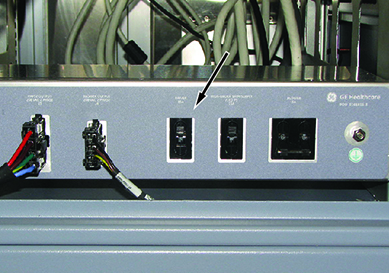
- Disconnect all connectors and cables from KASC.
Figure 2. KASC assembly and cables 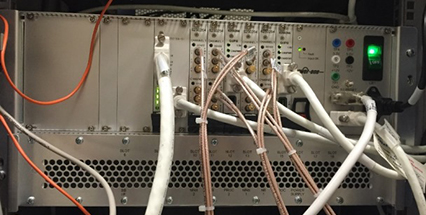
- Remove the KASC assembly as follows:
- Remove four screws.
- Slide the KASC out.
Figure 3. KASC assembly 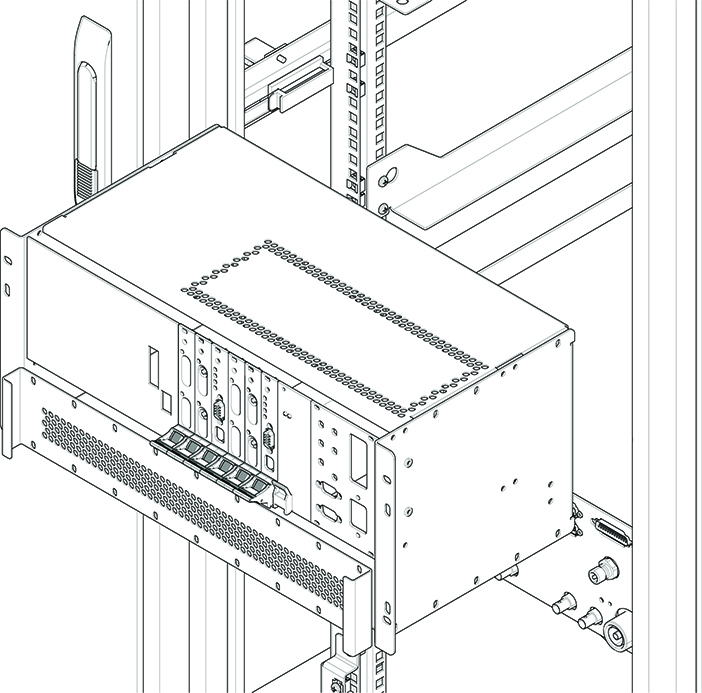
Finalization
- Restore the power.
- In the PEN cabinet, turn on the circuit breaker to the driver module.
- Remove LOTO from the reconstruction equipment. See the MR Service Safety Manual, PN 5452735.
- Turn on the ICNs per the ICN On/Off Procedure. Note: For the first 3 or 4 minutes, LEDs come on only at the rear of the ICN, next to the power cables. After 3 to 4 minutes, you will hear the ICN fans come on, and then the LED at the front of the ICN starts to flash.
- Do Calibrating RF Amplifier and UPM.
- Do a TPS Reset, and then do a check scan to make sure the system operates correctly.