
- SIGNA™ Hero 3.0T Service Methods
- 5852800-8EN Revision 1.0
- 00000018WIA30F70810GYZ
- id_20057022.16
- Dec 3, 2021 4:30:16 PM
Replacing the Operator Control Panel (OCP)
This procedure describes the removal and installation of the OCP including the keypads and E-stop button.
Prerequisites
| Personnel requirements | |||
|---|---|---|---|
| Required persons | Preliminary requirements | Procedure | Finalization |
| 1 | - | 75 minutes | 30 minutes |
| Tools and test equipment | |||
|---|---|---|---|
| Item | Quantity | Part number | Manufacturer |
| Nonmagnetic Titanium Service Tool Kit, Large Set | 1 | 5112581 | - |
| Replacement parts | |||
|---|---|---|---|
| Item | Quantity | Part number | Manufacturer |
| Operator Control Panel - Right | 1 | 5502141-3 | - |
| Operator Control Panel - Left | 1 | 5502141-4 | - |
| Safety |
|---|
|
Before working in any GE Healthcare MR suite or performing any GE Healthcare service procedure, you must:
If you have any safety concerns at any time, do not begin work or immediately stop work and move to a safe location. Immediately contact your supervisor or site safety officer for instructions on how to proceed. |
Removing the Operator Control Panel (OCP)
Prerequisites
| Personnel requirements | |||
|---|---|---|---|
| Required persons | Preliminary requirements | Procedure | Finalization |
| 1 | - | 25 minutes | 30 minutes |
Procedure
- Disconnect the cable from the Emergency Stop button.
Figure 1. Disconnect cable from Emergency Stop button 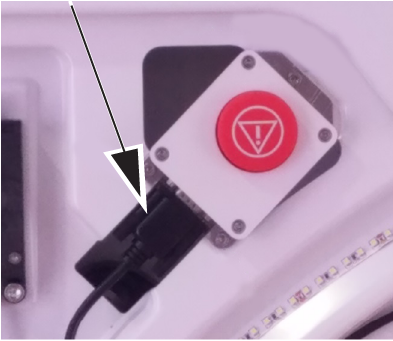
- Disconnect the cable from the OCP.
Figure 2. Disconnect cable from OCP 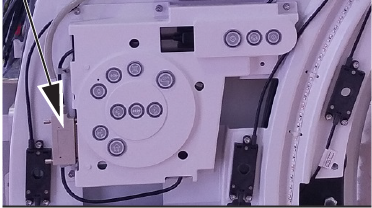
- Remove the six screws that attach the OCP to the magnet.
Figure 3. Operator control panel installation 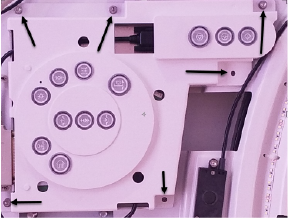
Installing the Operator Control Panel (OCP)
Prerequisites
| Personnel requirements | |||
|---|---|---|---|
| Required persons | Preliminary requirements | Procedure | Finalization |
| 1 | - | 20 minutes | 30 minutes |
Procedure
- Install an OCP.
Figure 4. Secure screws - Connect the grey cable to the OCP.
Figure 5. Connect cable to OCP - Connect the Emergency Stop cable.
Figure 6. Emergency Stop button
Finalizing Operator Control Panel (OCP) replacement
Prerequisites
| Personnel requirements | |||
|---|---|---|---|
| Required persons | Preliminary requirements | Procedure | Finalization |
| 1 | - | - | 30 minutes |