
- SIGNA™ Hero 3.0T Service Methods
- 5852800-8EN Revision 1.0
- 00000018WIA302A0E20GYZ
- id_131062906.4
- Jan 26, 2022 12:07:37 PM
Applying LOTO - ISC
Apply LOTO to the Power Distribution Unit (PDU) when servicing this item in the Integrated System Cabinet (ISC). Applying LOTO ensures a safe environment when working on this part.
Prerequisites
| Personnel requirements | |||
|---|---|---|---|
| Required persons | Preliminary requirements | Procedure | Finalization |
| 1 | - | 10 minutes | - |
| Tools and test equipment | |||
|---|---|---|---|
| Item | Quantity | Part number | Manufacturer |
| Brass Master Padlock with Brass Shackle | 2 | 46-194427P320 | - |
| Red LOTO Personal Lock Wrap | 2 | 2393068 | - |
| Multi-Locking Device (if multiple service personnel are involved) | 1 | 46-194427P313 | - |
| Red Warning LOTO Tag | 2 | 46-194427P322 | - |
| Digital Voltmeter (DVM) | 1 | 46-194427P284 | - |
About this task
| Warning | |
|---|---|
 | |
| Affected by LOTO | ||||
|---|---|---|---|---|
| Name of equipment | Number of locks | Titles of employees authorized to perform LOTO | Titles of affected employees | How to notify |
| 1 per GE FE | GE FEs | Hospital personnel | Verbal, posted signs |
Note: The following table describes the type, location, and magnitude of energy to be LOTO’d.
| Energy source | Yes | No | Location of energy isolating means | Magnitude of energy |
|---|---|---|---|---|
| Electrical | x | Main breaker of ISC | 380/400/415/480 VAC | |
| Pneumatic | x | |||
| Hydraulic | x | |||
| Gas/Water/Steam | x | |||
| Chemical | x | |||
| Mechanical Motion | x | |||
| Gravity | x | |||
| Springs | x | |||
| Thermal | x | |||
| Stored Energy | x | Time discharge of internal capacitors | 208 VAC, 420 VAC | |
| Air Under Pressure | x | |||
| Oil Under Pressure | x | |||
| Water Under Pressure | x | ICC | 5.0 Bar (80 psi) | |
| Gas Under Pressure | x | |||
| Steam | x | |||
| Other | x |
Types of equipment and/or methods selected to dissipate or isolate stored energy
About this task
Time method for dissipation of stored energy: 5 minutes.
Type(s) of equipment and/or method(s) used to ensure disconnection(s)
Procedure
- One personal lock and tag per FE at the site working on the de-energized equipment at the time of LOTO.
- Voltmeter to read voltage for verification that energy has dissipated in the PDU.
Power down the computer subsystems
About this task
System Power Off, under Access tab, is for customer use since it will require one hour at the most to power down the system to cool down gradient coil temperature, and reduce B0 drift in customer scan level. For service LOTO, use system shutdown for immediate shutdown. However, note that it will be required to wait 1 hour after restoring power for certain calibration and/or customer scan.
System shutdown when system is in operator level
Procedure
- From the Common Service Desktop, select and click Shutdown to shutdown the PC and ICN.
Figure 1. System shutdown 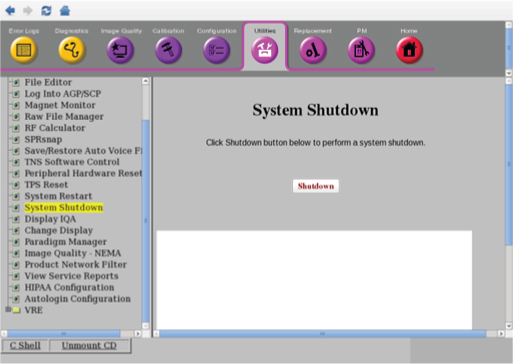
System shutdown when system is in root level
Procedure
- Right-click on the Linux desktop to access the Root Menu and then select Logout.
Figure 2. Logout 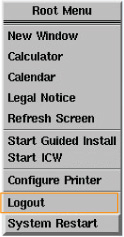
- Select on the Welcome login screen to shutdown the system.
Figure 3. Shutdown 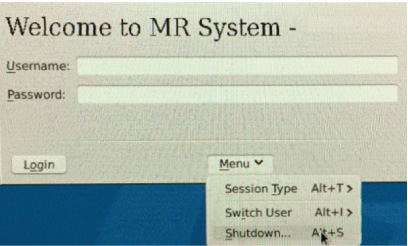
ISC PDU main breaker - lockout
Procedure
- Apply LOTO to the PDU input breaker by pressing the left-pointing arrow on the end of the handle to expose the location where the lock and tag can be placed.
Figure 4. Main input breaker in the Off position 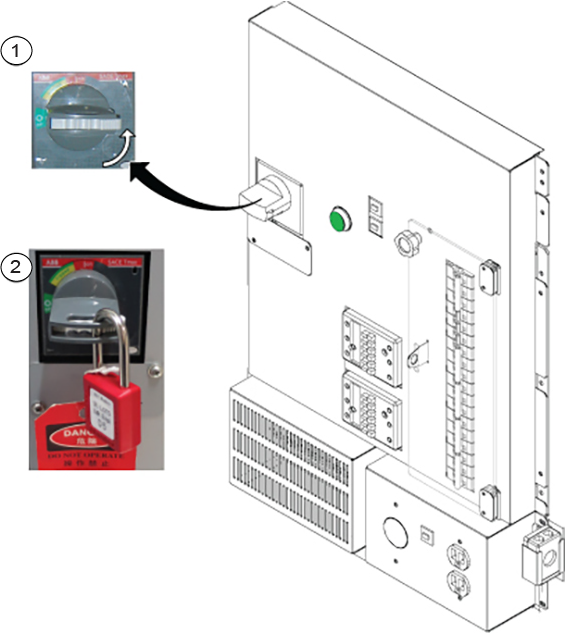
1 Press the left-pointing arrow on the end of the handle 2 Apply lock and tag