
- SIGNA™ Hero 3.0T Service Methods
- 5852800-8EN Revision 1.0
- 00000018WHA30A97EGYZ
- id_20028257.5
- Jul 8, 2021 8:24:16 PM
Installing the magnet front service access panel
Installs the front service access panel onto the magnet enclosure. This panel covers the components mounted on the left-hand side of the magnet.
Prerequisites
| Personnel requirements | |||
|---|---|---|---|
| Required persons | Preliminary requirements | Procedure | Finalization |
| 1 | - | 5 minutes | - |
Procedure
- Lower the front service access panel into position on the magnet enclosure. Make sure the tabs on the top of the panel engage the slots on the upper service access panel.
Figure 1. Front service access panel alignment 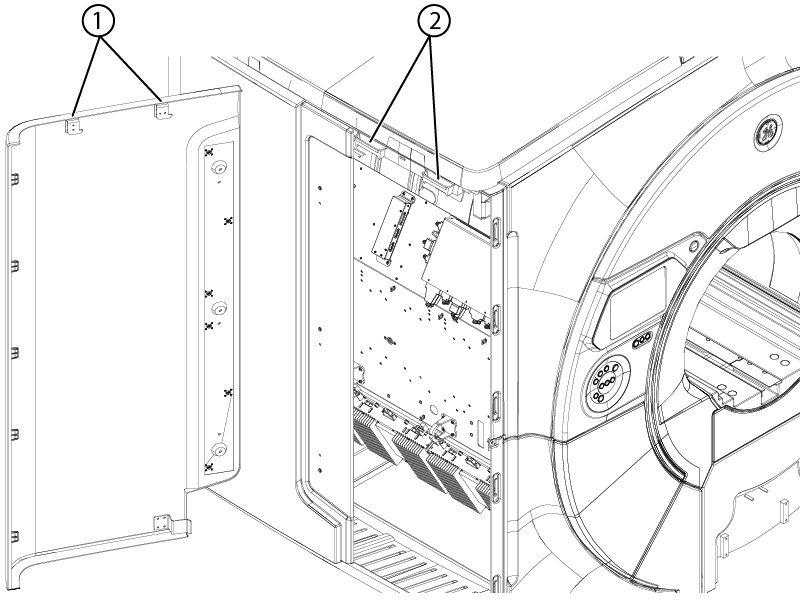
1 Tabs 2 Slots - Note: A tool, typically a screwdriver, can be inserted into the indicated alignment tool holes as required to align the front and rear service access panel screw holes.Install three M10 x 25 Socket Head Cap Screws securing the front service access panel to the rear service access panel. If the screw holes and cover holes do not align, insert a screwdriver or similar tool in the alignment tool holes and adjust the cover while installing the screws.
Figure 2. Front service access panel screws 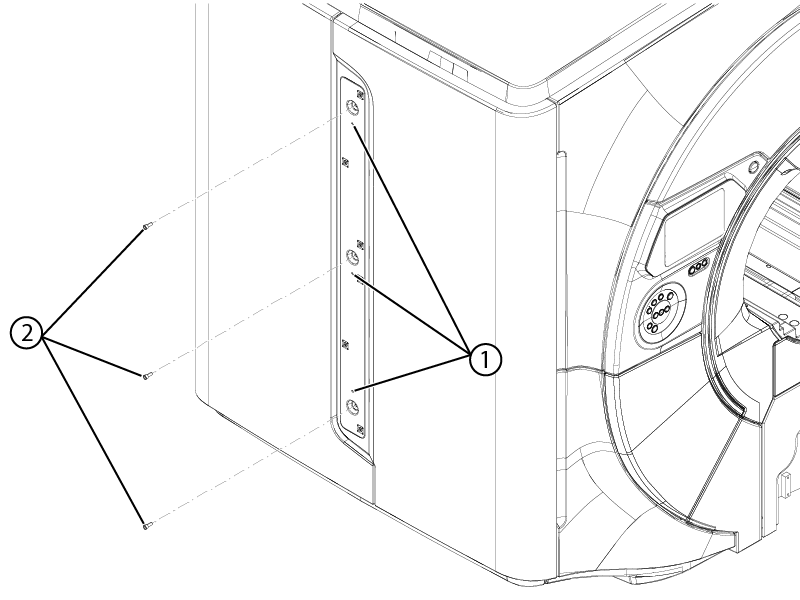
1 Alignment tool holes 2 M10 x 25 Socket Head Cap Screws