- id_2020126
- Version: 2.0
- Date: Oct 10, 2019 2:46:10 PM
Checking and filling hydraulic fluid
Checks and adjusts the hydraulic fluid level for the dockable patient table.
Procedure
- Undock the patient table and relocate it outside of the magnet room.
- Remove the upper bellows. See Patient Table Upper Bellows and Lower Base Side Cover Removal.
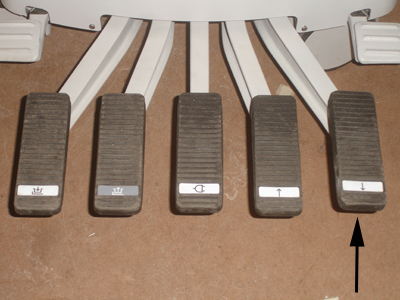
- Drop the table into the full down position by depressing the far right pedal located at the rear of the patient table.
Figure 1. Patient transport rear pedals
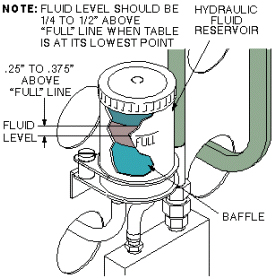
- Inspect the hydraulic fluid reservoir located at the rear of the patient table and determine if fluid needs to be added.note: Depending on the orientation of the reservoir, the full line may be on the back side.
Figure 2. Hydraulic fluid level check
- Add fluid as necessary based on observation from Step 4.
- Pump the table top to the fully raised position by depressing the second pedal from the right. (The LPCA reattaches with cradle automatically.)
- Replace the upper bellows.