- id_15271095
- Version: 4.1
- Date: Jan 28, 2020 1:01:16 PM
Patient table movement verification
Makes sure the patient table controls operate correctly.
Prerequisites
| Personnel requirements | |||
|---|---|---|---|
| Required persons | Preliminary requirements | Procedure | Finalization |
| 1 | - | 20 minutes | - |
| Safety |
|---|
|
Before working in any GE Healthcare MR suite or performing any GE Healthcare service procedure, you must:
If you have any safety concerns at any time, do not begin work or immediately stop work and move to a safe location. Immediately contact your supervisor or site safety officer for instructions on how to proceed. |
Table movement verification for patient table
Procedure
- Undock the patient table by pressing the second pedal from the
left at the rear of the table.
Figure 1. Pedals on patient table
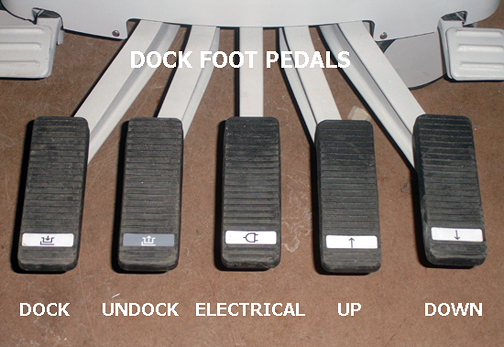
- Press the table Down pedal (far right) to initiate downward movement of the table top. Downward movement of the table top should stop when the pedal is released. Make sure the table travels from the highest to the lowest position in no more than 15 seconds, with the table unloaded.
- Pump the table Up pedal (second from right) to start upward movement of table. Make sure the table reaches its highest position in 15 pedal strokes or fewer. For accurate check of this function, use complete pedal strokes (push the pedal all the way down and let pedal come all the way up before starting next down stroke).
- Press the Caster Lock pedal on one of the rear casters to lock both rear casters.
- Make sure the caster locks inhibit all patient table movement when the pedal is in the locked position.
- Make sure there is no movement of the cradle while the patient table is undocked.
Figure 2. Engage caster lock pedal
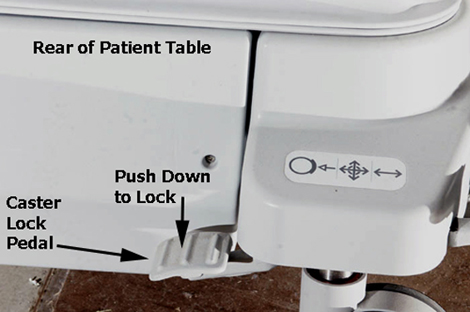
- Disengage the caster lock and repeat Step 4 on the opposite side.
- Disengage the caster lock and dock the patient table by aligning the table with the dock and then pressing the far left Dock pedal. Successful docking should not require excessive force. If the table is fully up when it is docked, make sure the carriage advances forward until it connects with the cradle latch immediately after docking.
- Make sure the emergency release lever (located on the right side of the dock) releases the patient table from the dock when it is pulled (make sure the LPCA has been disengaged from the cradle). If excessive force is required to pull the handle, adjust the dock hook tension.
Figure 3. Dock emergency release handle
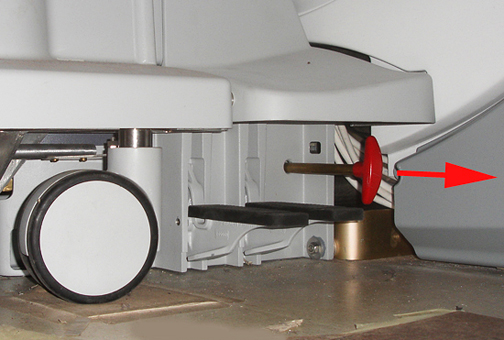
- Dock the patient table.
- Advance the LPCA and the cradle at least 100 mm into the bore. Make sure when you turn the cradle release handle at the rear of the cradle, it disengages the cradle from the LPCA. Refer to the cradle release adjustment procedures (Cradle Release Block Adjustment, Cradle Release from Carriage Adjustment, or Cradle Release from Patient Table).1648
Figure 4. Table release handles
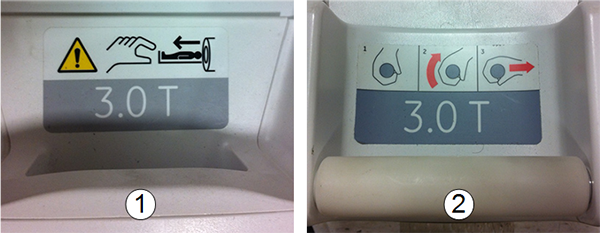
Item Description 1 Squeeze type latch 2 Twist-and-pull type latch - Check that pulling the emergency release lever (on the right side of the dock) with one arm releases the patient table from the dock (make sure the LPCA has first been disengaged from the cradle). If excessive force is required to pull the handle, adjust dock hook tension. See Dock Centering and Dock Hook Tension Adjustment.
- With the cradle fully in the bore, make sure the table Down pedals on both the dock and table itself do not allow the table to go down. If the table does move down, see Cradle Home Table Down Interlock Adjustment.