
- SIGNA™ Hero 3.0T Service Methods
- 5852800-8EN Revision 1.0
- 00000018WIA300AC230GYZ
- id_156673601.21
- Oct 7, 2021 3:36:05 PM
RF Body Coil Replacement
Prerequisites
| Required persons | Preliminary requirements | Procedure | Finalization |
|---|---|---|---|
| 3 | - | 4 hours | - |
| Item | Quantity | Effectivity | Part number | Manufacturer |
|---|---|---|---|---|
| Authorized Personnel Floor Sign | 1 | - |
2289812 | - |
| Nonmagnetic Titanium Service Tool Kit, Large Set | 1 | - | 5112581 | - |
| Step Gauge | 1 | - |
| - |
| Safety Glasses | 1 | - |
| - |
| Cut-Resistant Gloves | 1 | - |
| - |
| Safety Shoes | 1 | - |
| - |
| Small carpenter's level | 1 | - |
| - |
| Item | Quantity | Effectivity | Part number | Manufacturer |
|---|---|---|---|---|
| Adhesive | 1 | - |
46-220312P1 | - |
| Anti-seize | 1 | - |
2119594 | - |
| Item | Quantity | Effectivity | Part number | Manufacturer |
|---|---|---|---|---|
| Body Coil | 1 | - |
Refer to FRU manual | - |
| ||||||||||||


| Condition | Reference | Effectivity |
|---|---|---|
|
System Power must be turned OFF. Refer to LOTO for ISC. | - | - |
About this task
Use this procedure to replace the RF body coil.
Procedure
- Near the magnet room, open FRU Box.Note: Top Case will be used to locate the defective body coil.
Figure 1. FRU Box 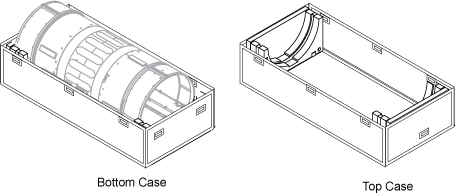
- Disconnect the two (2) cooling air ducts at the rear end of the body coil.
Figure 2. Disconnecting the cooling air ducts 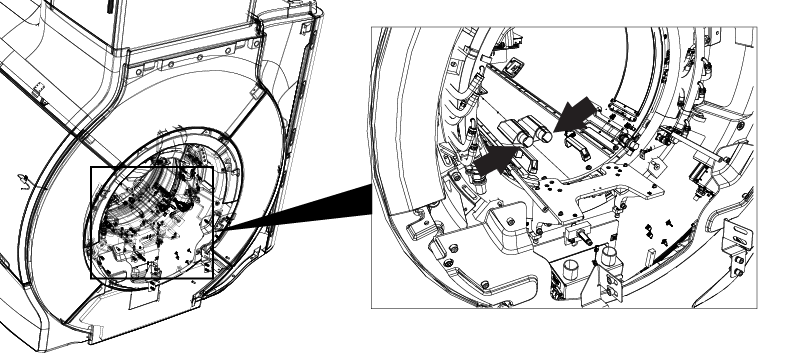
- Disconnect the HART ID cable at the rear end of the body coil.
Figure 3. Disconnecting the HART ID cable 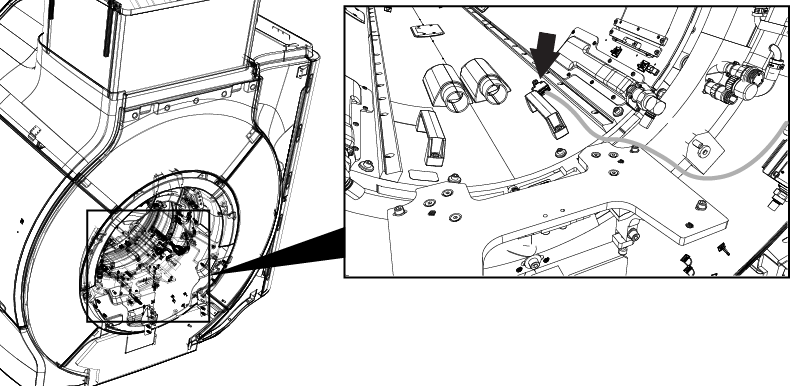
- On the rear end of the magnet, disconnect the CH1 and CH2 drive cables from the RF body coil.
Figure 4. Disconnecting the CH1 and CH2 drive cables 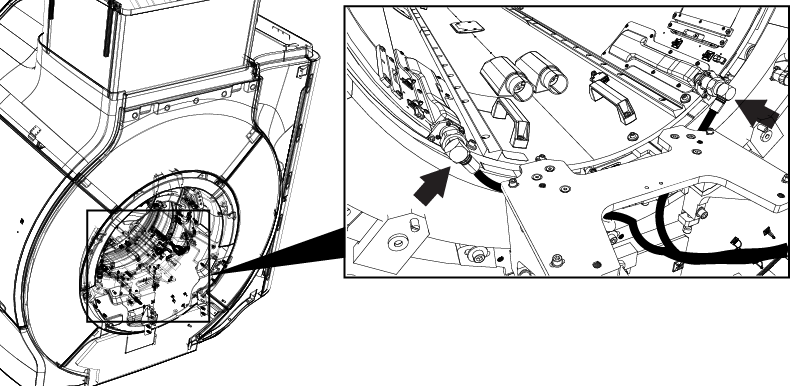
- Disconnect the bore light cable connectors. (Front End: 2 connectors, Rear End: 2 cables)
Figure 5. Disconnecting the rear bore lights 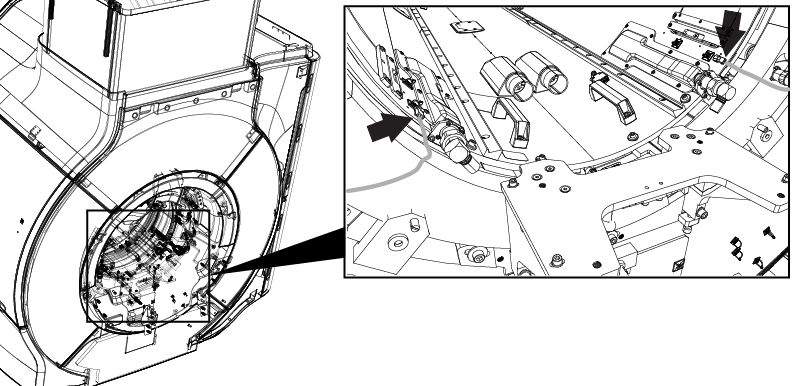
Figure 6. Disconnecting the front bore lights 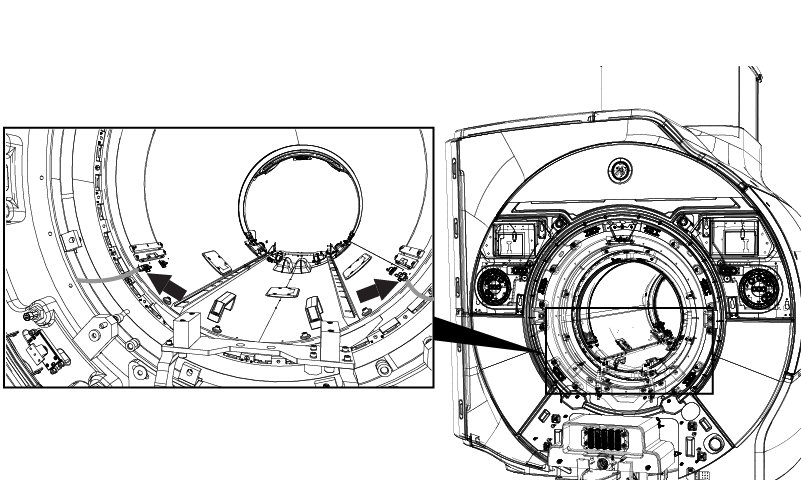
- At rear end of the magnet, remove four M6 bolts and washers securing the RF body coil.
Figure 7. Removing the M6 bolts and washers 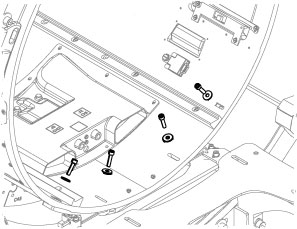
- On the front end of the magnet, remove four M6 bolts and washers from the bases of RF coil centering assembly.
Figure 8. Removing the RF coil centering assembly bolts 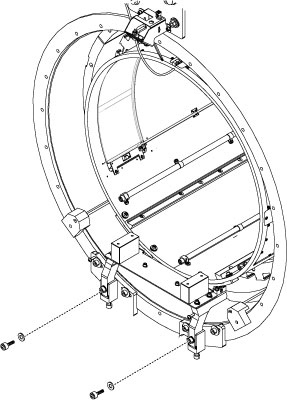
- Remove the air flow sensors and tape them to the magnet enclosure in a position that will not interfere with the body coil removal.
Figure 9. Removing the air flow sensors 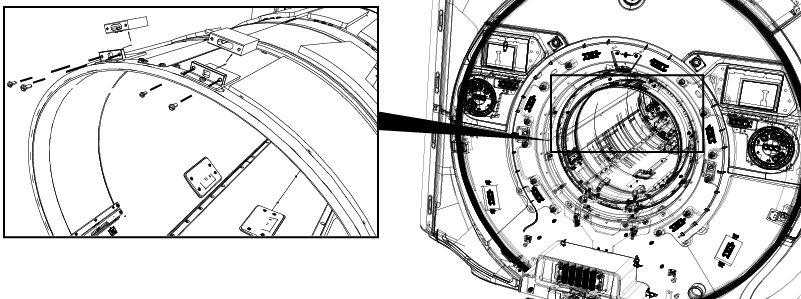
From the front of the magnet, pull the body coil forward until the front end is outside the bore.CAUTION 
Figure 10. Moving the body coil 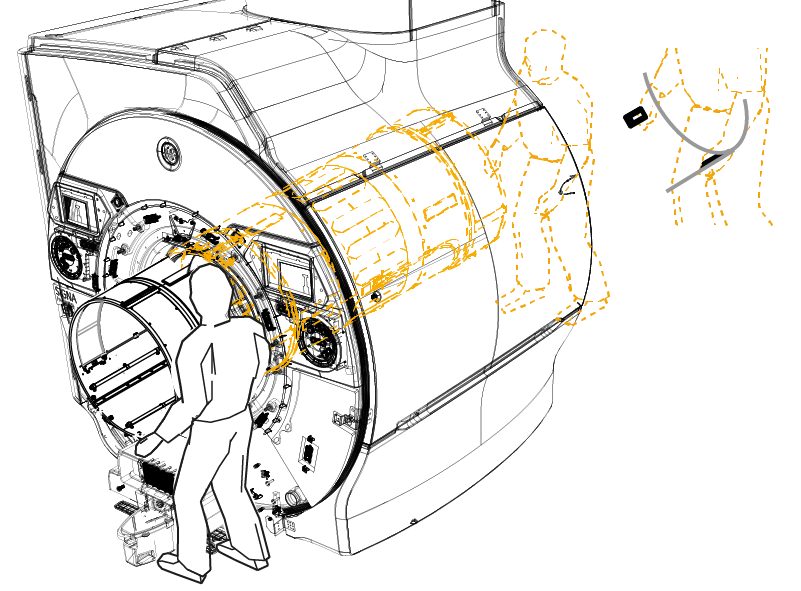
- Remove the temperature sensor and attach it to the magnet enclosure with masking tape so it is out of the way of body coil removal.
Figure 11. Removing the temperature sensor 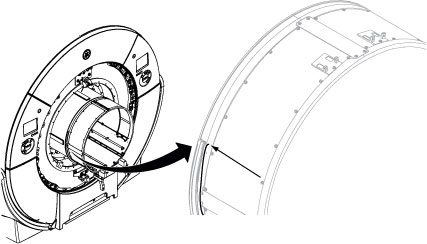
- Remove the RF coil centering assemblies.
Figure 12. Removing the body coil mount rear assembly 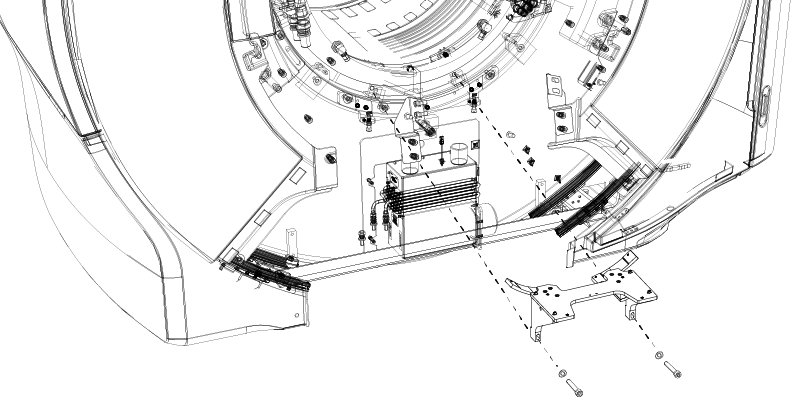
- Fully remove the RF body coil and place it inside the empty bottom half of the FRU case.
Figure 13. Removing the RF body coil 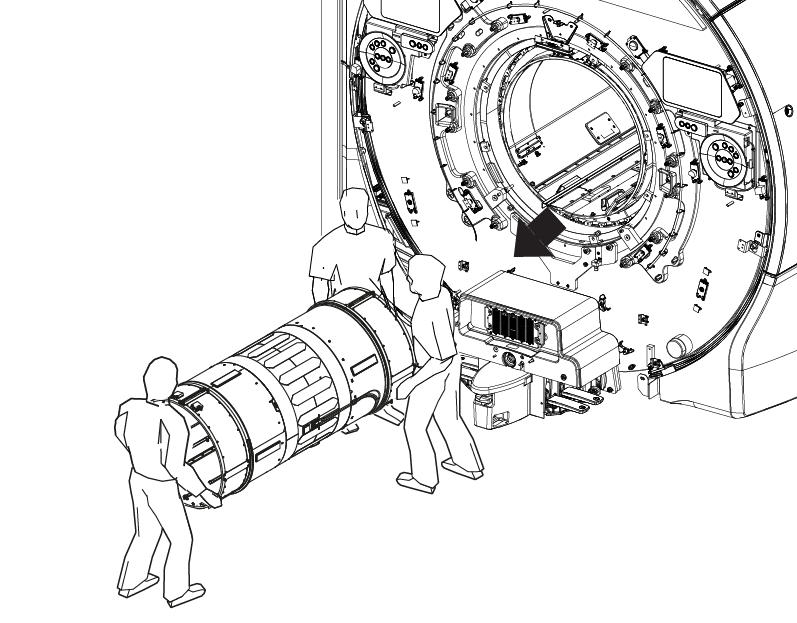
Partially slide the new RF body coil into the bore, leaving a section on the front outside the bore.CAUTION Figure 14. Installing the RF body coil - On the front end of the body coil, transfer the front RF coil centering assembly from the body coil being replaced to the new RF body coil.
Figure 15. Transferring the coil centering assembly 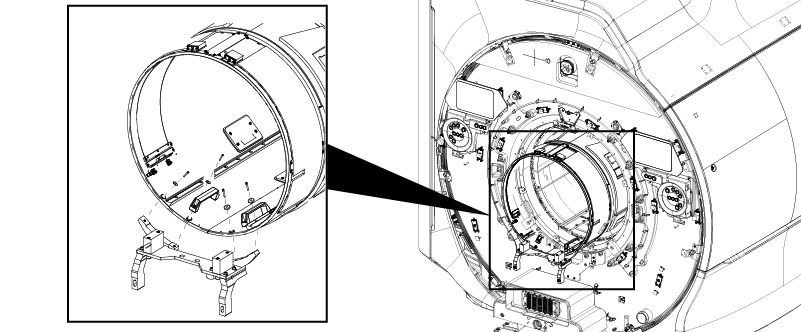
- Restore the rear bridge support and secure with 5 screws.
Figure 16. Installing the rear bridge support 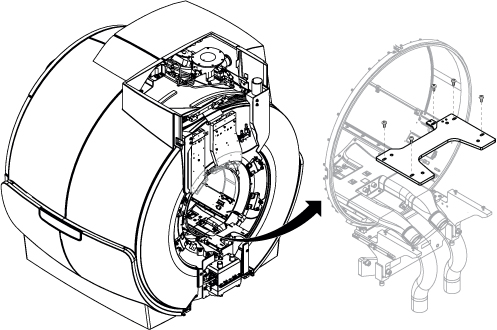
- Reconnect the Hart ID cable.
Figure 17. Reconnecting the HART ID cable - On the rear of the RF body coil, reconnect the CH1 and CH2 drive cables.
Figure 18. Reconnecting the CH1 and CH2 drive cables - Reconnect the bore light cable connectors.
(Front End: 2 connectors, Rear End: 2 cables)
Figure 19. Reconnecting the rear bore light connections Figure 20. Reconnecting the front bore light connections - Restore the air flow sensors.
Figure 21. Restoring the air flow sensors - Restore the two (2) cooling air ducts at the rear end of the body coil.
Figure 22. Reconnecting the cooling air ducts - Reconnect the CH1 and CH2 drive cables to the RF body coil.
Figure 23. Reconnecting the CH1 and CH2 drive cables - Restore the dockable table interface cover.
Figure 24. Installing the dock interface cover 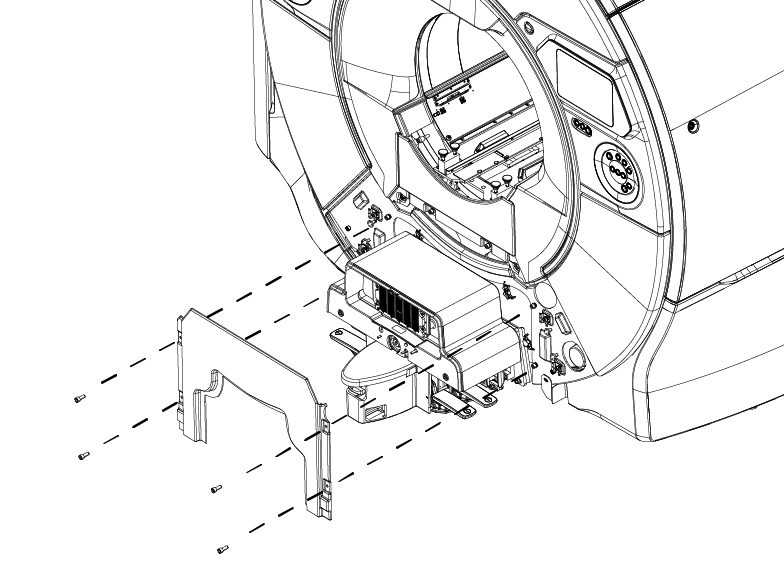
- Restore the right and left side covers.
Figure 25. Installing the right and left side covers 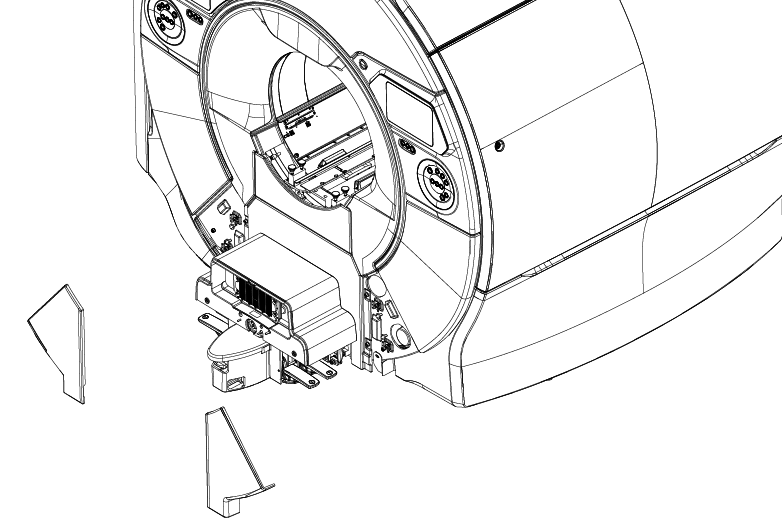
Finalization
-
Note: Required calibrations and functional checks after body coil replacement are done in the RF body coil tuning procedure, below.Remove LOTO. Refer to Removing LOTO - ISC.
- Perform Body Coil Tuning.
- Perform Dual Drive Quadrature Calibration. Refer to Dual drive quadrature tool.
- Return defective body coil in the FRU Box.
Return unused dielectric materials in the FRU box with the defective RF body coil.