
- SIGNA™ Hero 3.0T Service Methods
- 5852800-8EN Revision 1.0
- 00000018WIA30ACA230GYZ
- id_156673401.26
- Oct 7, 2021 2:47:36 PM
Body Coil Mount and Base Plate (Rear) Replacement
Prerequisites
| Required persons | Preliminary requirements | Procedure | Finalization |
|---|---|---|---|
| 2 | Not Applicable | 2 hours | - |
| Item | Quantity | Effectivity | Part number | Manufacturer |
|---|---|---|---|---|
| Nonmagnetic Titanium Service Tool Kit, Large Set | 1 | - | 5112581 | - |
| Cut-Resistant Gloves | 1 | - |
| - |
| Non-magnetic small level | 1 | - |
| - |
| Item | Quantity | Effectivity | Part number | Manufacturer |
|---|---|---|---|---|
| Rear Body Coil Mount | 1 | - |
Refer to FRU manual | - |
| ||||

About this task
Overview
Use this procedure to replace the Body Coil Mount and Base Plate(Rear).
Body Coil Mount Rear Assembly Removal
Procedure
- Disconnect the two (2) cooling air ducts at the rear end of the body coil.
Figure 1. Disconnecting the cooling air ducts 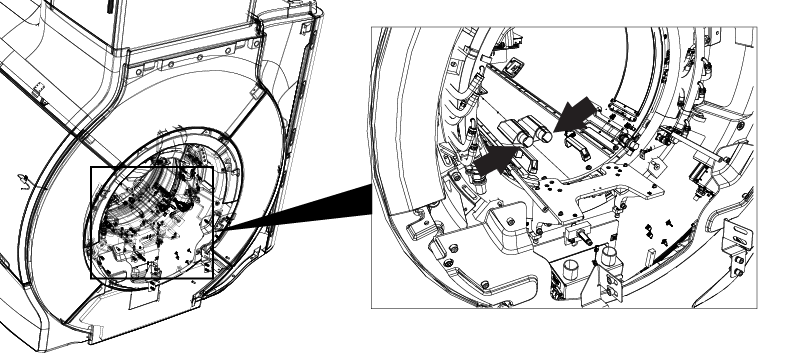
- Disconnect the HART ID cable at the rear end of the body coil.
Figure 2. Disconnecting the HART ID cable 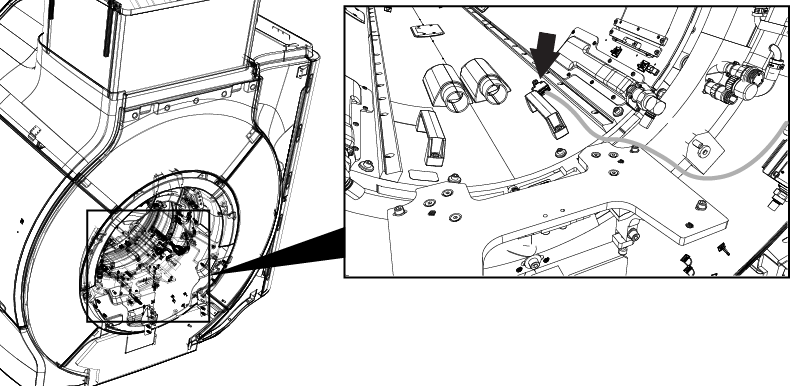
- Disconnect the CH1 and CH2 drive cables from the RF body coil in the rear.
Figure 3. Disconnecting the CH1 and CH2 drive cables 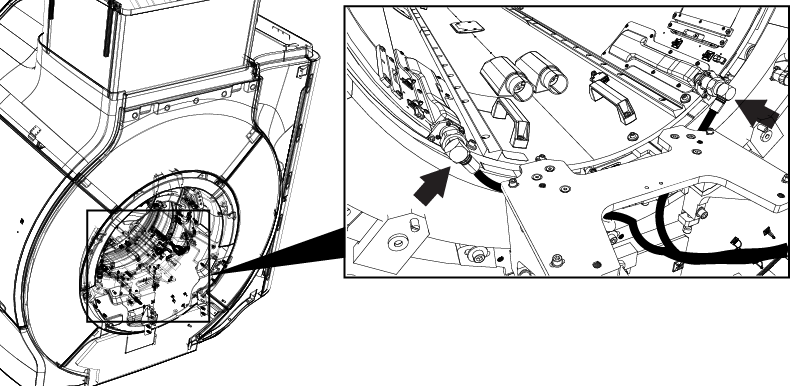
- Disconnect the bore light cable connectors. (Front End: 2 connectors, Rear End: 2 cables)
Figure 4. Disconnecting the rear bore light connections 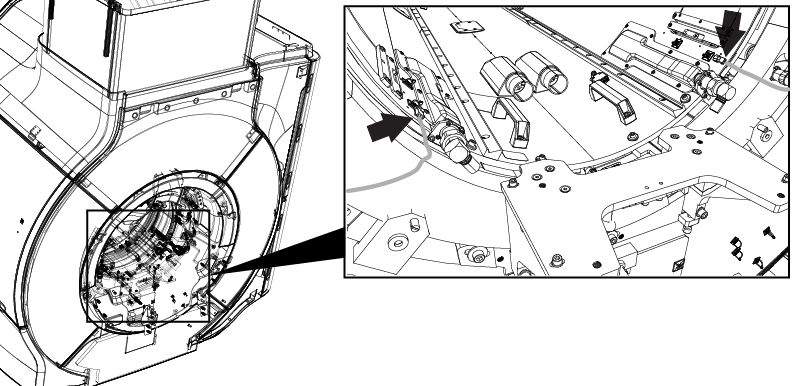
Figure 5. Disconnecting the front bore light connections 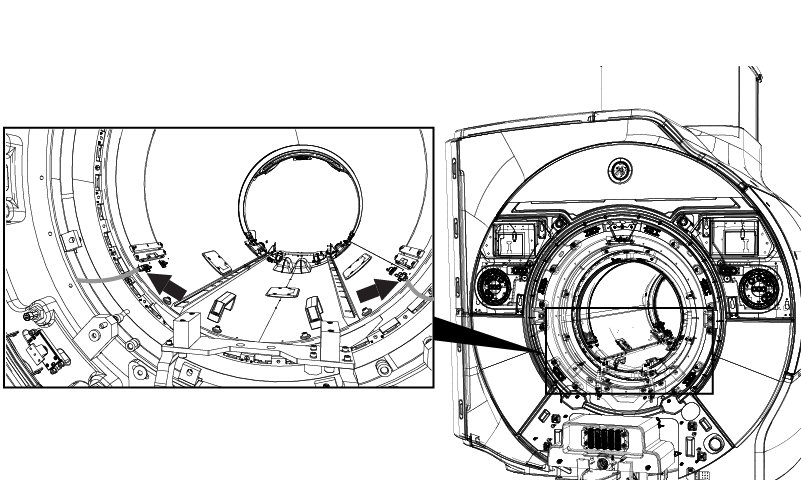
- At rear end of the magnet, remove four M6 bolts and washers securing the RF body coil.
Figure 6. Removing the rear end of the body coil 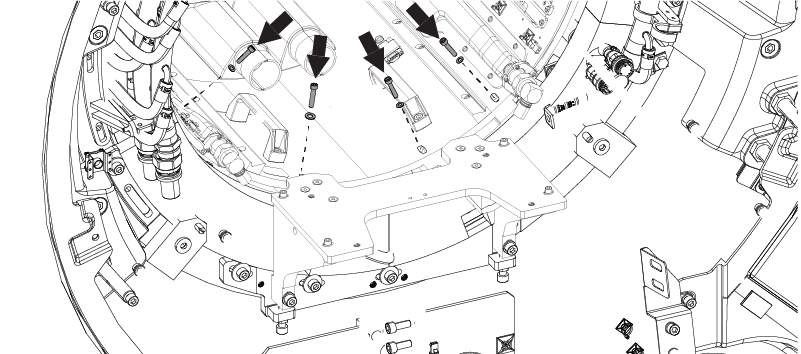
- On the front end of the magnet, remove four M6 bolts and washers from the bases of RF coil centering assembly.
Figure 7. Removing the RF coil centering assembly bolts 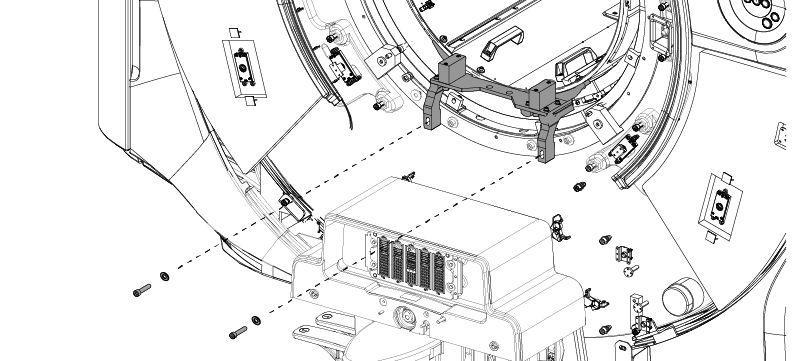
- Remove the air flow sensors and tape them to the magnet enclosure in a position that will not interfere with the body coil removal.
Figure 8. Removing the air flow sensors 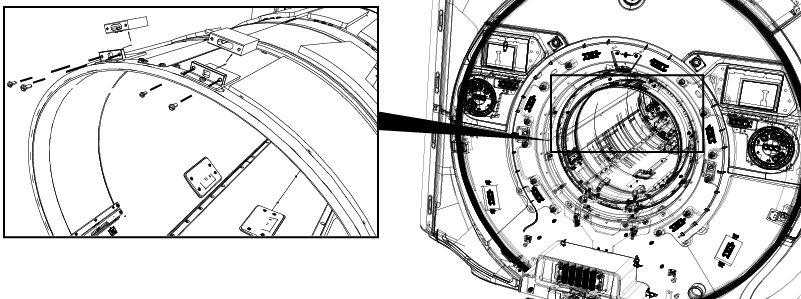
From the front of the magnet, pull the body coil forward until the front end is outside the bore.CAUTION 
Figure 9. Moving the body coil 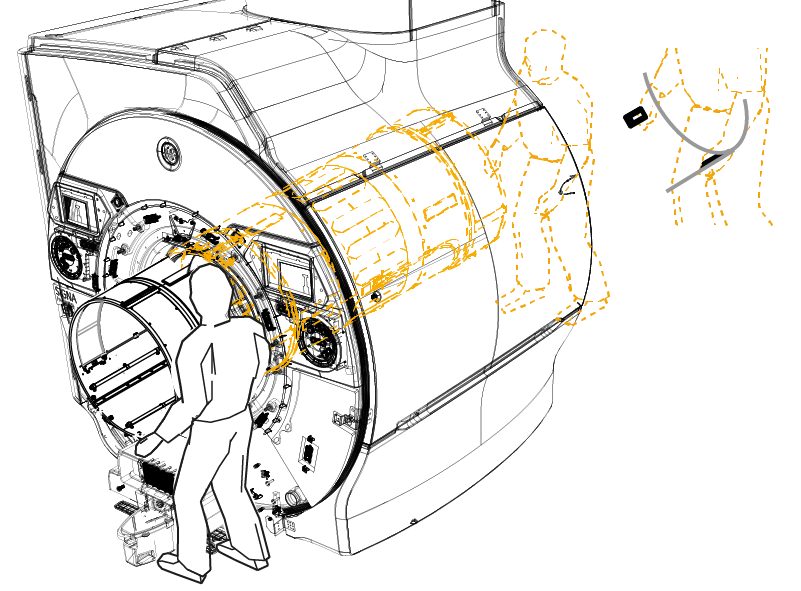
- Remove the body coil mount rear assembly.
Figure 10. Removing the body coil mount rear assembly 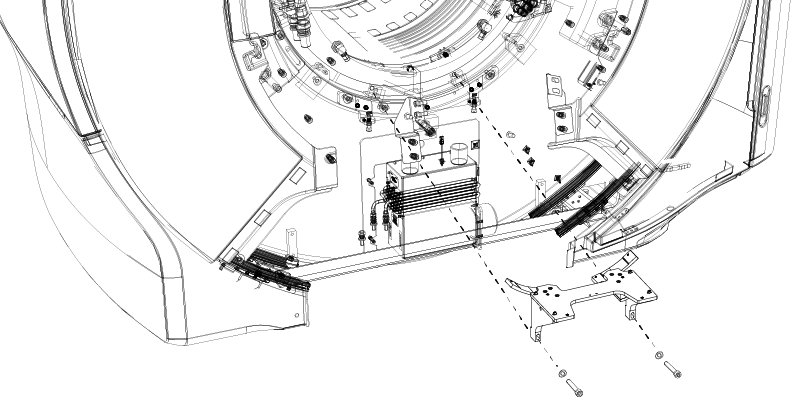
Rear Base Plate Replacement
Procedure
Confirm the rear base plate is not damaged. If the rear base plate is not damaged or body coil mount is not replaced from old type to new type, skip this section and go to Restoration.Notice 
- On the rear end of the magnet, mark alignment lines on each end of the centering assembly base plate.
Figure 11. Marking alignment lines (magnet rear end) 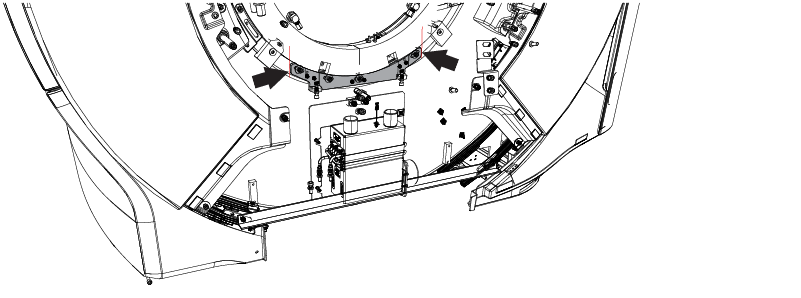
- Remove the base plate.
Figure 12. Removing the base plate 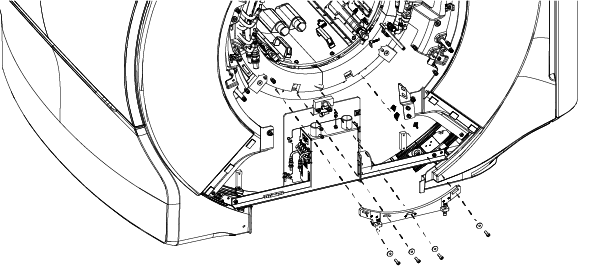
- Adjust the height of screw of the new base plate to make the height approximately equal to the old base plate. Then, tighten the lock nuts. Note: This adjustment is the rough adjustment for centering the body coil in the magnet bore. Fine adjustment will be done in body coil isolation procedure later. There is no specification in this step.
-
A≒A’
-
B≒B’
Figure 13. Adjusting the screw height 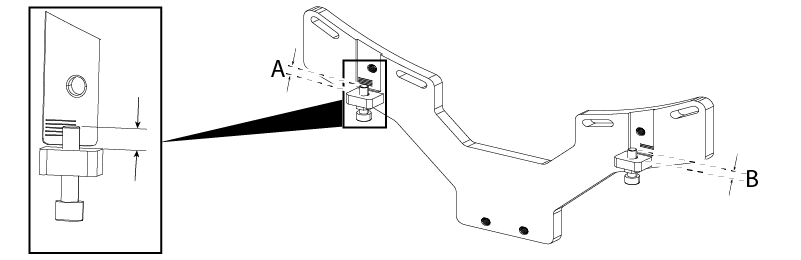
-
- Align and install the new rear base plate on the magnet with 2 screws (1000-M10C45-33) and washers (2000-M10C-10).
Figure 14. Restoring the base plate 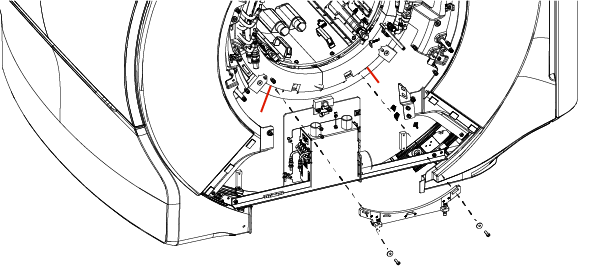
- Install level block with two screws (1000–M10C35–33).
Figure 15. Installing the leveling block 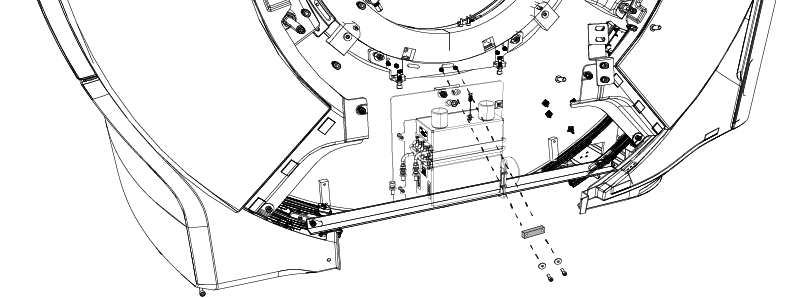
- Place the non-magnetic level on the level block and confirm that the level bubble is centered between the lines. If not, loosen the two screws and level the base plate position.
Figure 16. Leveling the rear base plate 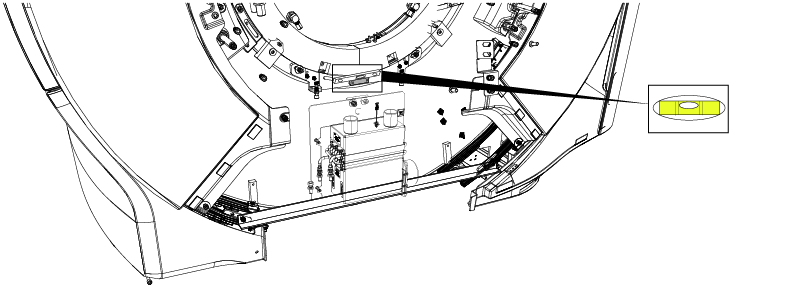
- Remove the leveling block.
Figure 17. Remove the leveling block - Install two screws and washers in the base plate.
Figure 18. Secure the base plate with the final screws 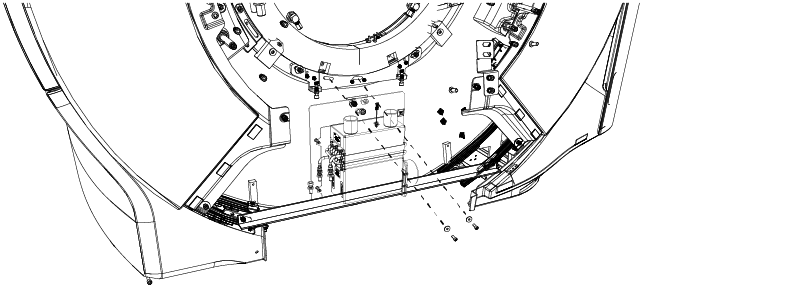
Restoration
Procedure
- Install the new body coil mount rear assembly.
Figure 19. Installing the body coil mount rear mount rear assembly
Restore the body coil to the original location.CAUTION Figure 20. Restoring the body coil - Connect the front bracket to the base bracket.
Figure 21. Securing the front end of the body coil - Secure the body coil to the rear bracket with four M6 bolts and washers.Note: If the body coil is not replaced, reuse the same washers and screws which were originally used for fixing the rear of the body coil.
If the body coil is replaced, use the large glass laminate washers (5988407) and M6x30 screws (1000-M6C030-33) which are included in body coil FRU.
Figure 22. Securing the rear end of the body coil - Reconnect the bore light cable connectors. (Front End: 2 connectors, Rear End: 2 cables)
Figure 23. Reconnecting the rear bore light connections Figure 24. Reconnecting the front bore light connections - Reconnect the bore light cable connectors. (Front End: 2 connectors, Rear End: 2 cables)
Figure 25. Reconnecting the rear bore light connections Figure 26. Reconnecting the front bore light connections - Restore the air flow sensors.
Figure 27. Air flow sensors - Restore the two (2) cooling air ducts at the rear end of the body coil.
Figure 28. Reconnecting the cooling air ducts - Reconnect the CH1 and CH2 drive cables to the RF body coil.
Figure 29. Disconnecting the CH1 and CH2 drive cables
Finalization
Procedure
- Note: Required calibrations and functional checks after body coil replacement are done in the RF body coil tuning procedure, below.Remove LOTO. Refer to Removing LOTO - ISC.
- Perform Dual Drive Quadrature Calibration. Refer to Dual drive quadrature tool.
- Perform the system performance test (SPT)Doing the System Performance Test (SPT) .