Multi-Locking Device (if multiple service personnel are involved)
1
-
46-194427P313
-
Red Warning LOTO Tag
1
-
46-194427P322
-
About this task
Warning
Electrocution hazard
High voltage present.
Use proper LOTO procedures before servicing and/or maintaining.
Prior to performing work on the Global Operator Console (GOC) or items in the Operator Workspace, a LOTO-authorized GE Field Engineer (FE) must perform the steps in this Lock Out / Tag Out (LOTO) Procedure. Completing all steps in this procedure ensures a safe environment when working on these parts.
Table 3. Details of Procedure
Name of equipment
Number of locks
Titles of employees authorized to perform LOTO
Titles of affected employees
How to notify
Host PC and operator’s workspace equipment
1 per GE FE
GE FEs
Hospital Personnel
Verbal, Posted signs
Energy source
Yes
No
Location of energy isolating means
Magnitude of energy
Electrical
x
Power Distribution Unit (PDU) circuit breaker panel
120VAC
Pneumatic
x
Hydraulic
x
Gas/Water/Steam
x
Chemical
x
Mechanical Motion
x
Gravity
x
Springs
x
Thermal
x
Stored Energy
x
Air Under Pressure
x
Oil Under Pressure
x
Water Under Pressure
x
Gas Under Pressure
x
Steam
x
Other
x
Topic ID: id_SL550107-1178700
PDU with Plastic breaker Cover- Sub-System Lockout
Procedure
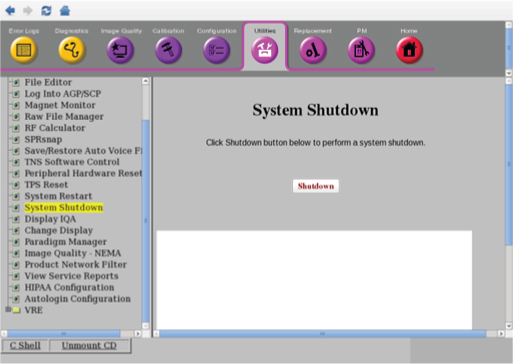
From the Common Service Desktop, select Utility > System Shutdown and click Shutdown.
Figure 1. System Shutdown
Confirm that the GOC is shutdown.
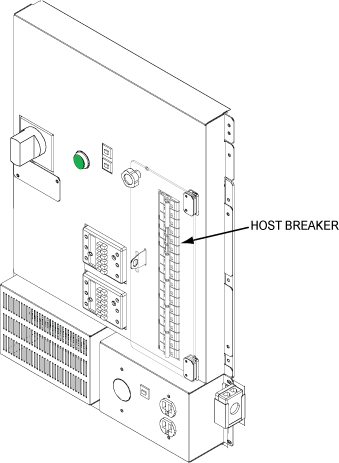
Open plastic Cover. Remove power to the Operators Workspace by shutting off the HOST breaker on the front of the PDU.
Figure 2. Breaker locations on PDU
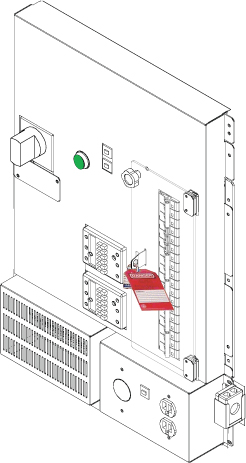
Lock and Tag the Breaker Panel on the PDU.
Figure 3. Lock and Tag the Breaker Panel
Topic ID: id_SL2087919-1178700
PDU with Plastic breaker Cover- Sub-System Lockout - Restoring Power
Procedure
Alert necessary personnel that power is being re-applied.
Remove the lock and the tag.
Open plastic door over the front of the PDU breakers and switch on HOST Breaker on the PDU.