
- SIGNA™ Hero 3.0T Service Methods
- 5852800-8EN Revision 1.0
- 00000018WIA309FA230GYZ
- id_156671801.5
- Jul 13, 2021 4:27:36 PM
Cabinet Power Switch Replacement
Prerequisites
| Required persons | Preliminary requirements | Procedure | Finalization |
|---|---|---|---|
| 1 | Not Applicable | 20 minutes | 10 minutes |
| Item | Quantity | Effectivity | Part number | Manufacturer |
|---|---|---|---|---|
| Standard Screw Driver | 1 | - | - | - |
| ||||

Procedure
- Remove the service cover and disconnect ground cable
- Remove two screws.
- Lift up and remove service cover. (Be careful to strain the ground cable)
- Disconnect ground cable.
Figure 1. Remove the service cover and disconnect ground cable 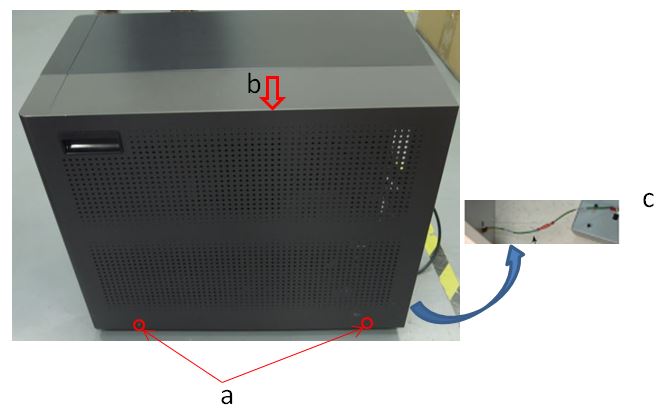
- Remove two screws and remove switch cover.
- Remove two screws.
- Remove switch cover.
Figure 2. Switch cover removal 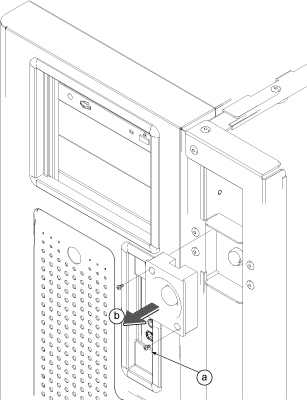
- Disconnect connector from rear of Power Switch.
Figure 3. 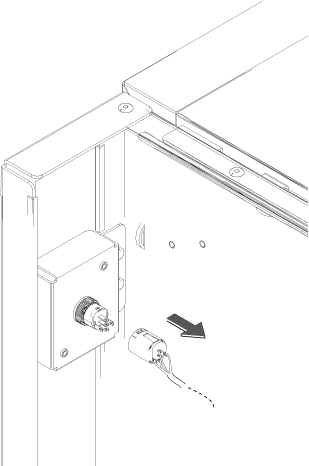
- Rotate plastic nut and remove it that securing the switch.
Figure 4. Plastic nut and removal 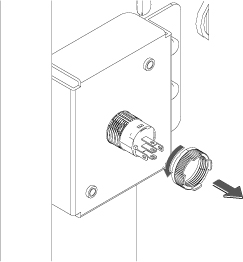
- Pull the Power Switch to the front and remove it.
Figure 5. 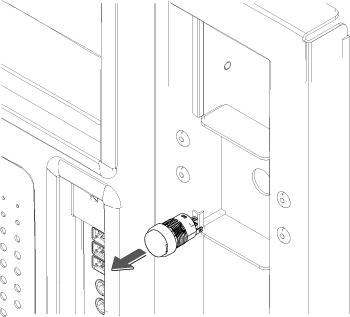
Finalization
- Restore power to the GOC. Refer to LOTO for GOC.
- Perform check scan.