
- SIGNA MR355 / SIGNA MR360
- Service Manual
- 5856356-3EN Revision 5.0
- Basic Service Documentation. Copyright General Electric Company.
- 00000018WIA305BFF20GYZ
- id_131058931.3
- Jul 5, 2019 11:18:59 PM
Determining the Software Revision for Linux
Prerequisites
| Required persons | Preliminary requirements | Procedure | Finalization |
|---|---|---|---|
| 1 | Not Applicable | 5 minutes | Not Applicable |
About this task
There are two different methods for acquiring the software revision. Whichever method you use, enter the command sw_config_status and press Enter.
Using the Common Service Desktop
Procedure
- For Release and software revision information, see Figure 1.
Figure 1. Common Service Desktop Home Screen 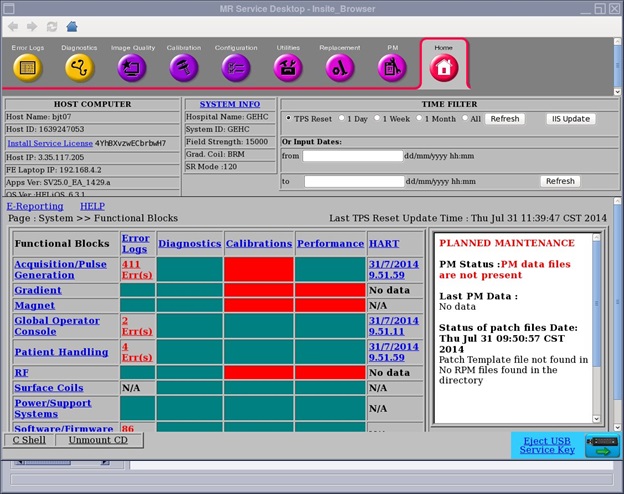
Using a C-Shell
Procedure
Finalization
No finalization steps.