
- SIGNA MR355 / SIGNA MR360
- Service Manual
- 5856356-3EN Revision 5.0
- Basic Service Documentation. Copyright General Electric Company.
- 00000018WIA307F8F20GYZ
- id_131063421.4
- Nov 6, 2020 10:14:43 PM
Hardware Status Check
This material covers checking the status of the devices, including the use of the hwStatus command. On occasion, it is helpful to know the status of the peripheral devices. The Serial Peripheral Interface (SPI), which is located on the Scan Control Processor (SCP) Board, reports the status of each peripheral device.
Sometimes, when there is a fault, the LEDs on the hardware peripheral devices do not match the state reported by SPI. This is when the hwStatus command is useful. It can check the SPI view of the state of the hardware. For example, if the scanner will not go to Ready, and it is not obvious what is causing the problem, the command can help you locate the cause of the problem.
It is most helpful to use the error log in conjunction with the hwStatus command. USING THE HWSTATUS COMMAND describes how to execute this command.
The hwStatus command cannot be used to change the state or status of any piece of hardware on the MDS Link. It is used only for reporting what the SPI thinks the state of the MDS peripheral devices are.
USING THE HWSTATUS COMMAND
-
Open Service Browser.
-
Click the 'Utilities' icon at the top of the Common Service Desktop.
-
Select Log Into ICE from the menu on the left side of the screen.
Figure 1. Log Into ICE 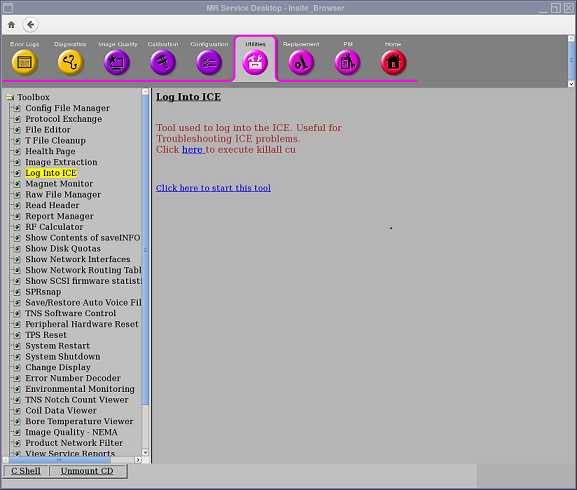
-
Output result.
Figure 3. hwStatus Command Output 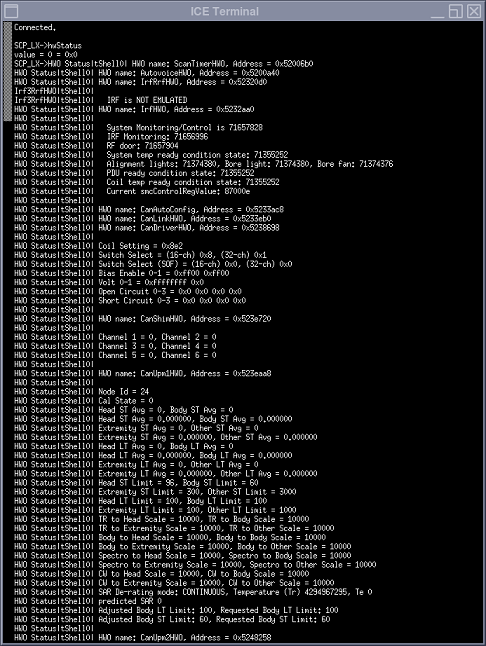

System Restoration
-
Close the SCP and AGP windows when done.
-
Perform a head or body scan to ensure system functionality.