- SIGNA MR355 / SIGNA MR360
- Service Manual
- 5856356-3EN Revision 5.0
- Basic Service Documentation. Copyright General Electric Company.
- 00000018WIA30135F20GYZ
- id_131074771.1
- Jul 5, 2019 10:25:11 PM
Error Log Utility
The System Error log can get very lengthy and unnecessarily use up memory. The following procedure should be used to prune (clean up) your error log. This utility does not continuously monitor the size of the error log. It does prune the log to the specifications that are entered each time the utility is run.
-
On the Service Desktop, select the C Shell button.
-
Type prune and press Enter.
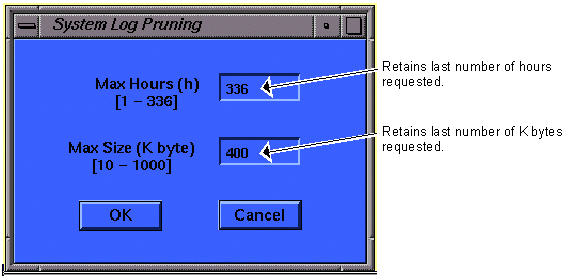
Note:Use both the hours and K byte to prune log. (e.g., if set to 24 hours and 50 k bytes but there are 100 K bytes of errors in last 24 hours, it will prune to 50 K bytes; this could cause only 1- 23 hours to be saved.)
-
Enter the hours and/or size for Pruning criteria. (See Figure 1 for the recommended settings.)
-
Click on OK.
-
Exit the C-Shell by typing exit and pressing Enter.