• Topic ID: id_2003006
  • Version: 5.0
  • Date: Jul 8, 2019 1:45:00 PM

Distributing and installing eLicenses for software options

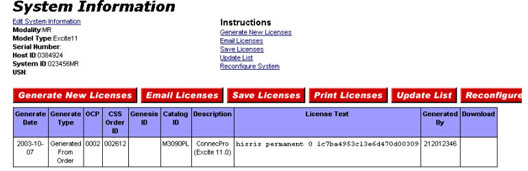
The distribution options can be accessed from the eLicense System Information screen shown below. See Viewing existing licenses for a system to access this page.

Figure 1. System information screen
There are several methods for installing eLicense option keys on the system.

note: The preferred method of installing option keys is to burn to a CD/DVD. The option key auto download may not install all option keys if dependent keys are not on the system.

Notice Image
  • notice
  • Potental de-rated system configuration
  • When installing options on a system, make sure the option matches the upgrade being performed. All other conflicting option keys should be removed. Failure to remove them can result in a de-rated system configuration.
  • EXAMPLE 1: System options for HiSpeed and EchoSpeed are both installed. The result is the system will perform as a HiSpeed, NOT as an EchoSpeed. The HiSpeed option must be removed to allow the system to configure as an EchoSpeed.
  • EXAMPLE 2: System options for 8-Channel and 16-Channels are both installed. The 8-Channel option must be removed to allow the system to configure as a 16-Channel.