- id_2003011
- Version: 4.0
- Date: Jul 10, 2019 2:40:30 PM
Modifying system information
Procedure
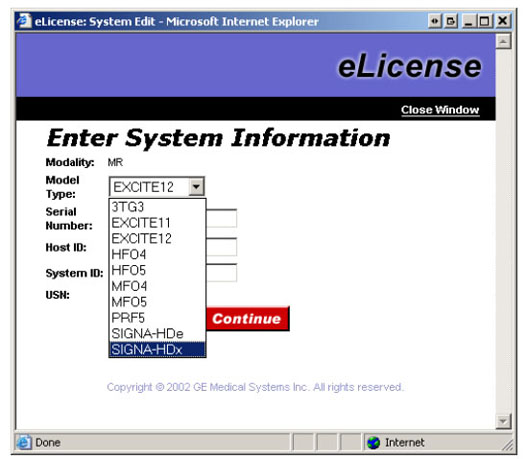
- Access the System Information page or click the Details button on the Order Information screen.The eLicense: System Edit pop-up dialogue will open.
- Modify the system information as needed.
Figure 1. Edit system information screen
 note: All changes to system information and host ID are tracked based on your single sign-on ID. Any suspicious usage of this feature will be rigorously checked to verify the modification was due to a valid problem.
Model type System description EXCITE11 or MR All 1.5T and 3.0T 11.x systems without G3 software 3TG3 Only for early 11.x systems with G3 software. All other 11.x systems choose EXCITE11 EXCITE12 or MR All 1.5T and 3.0T 12.x (HD) systems SIGNA-HDe All 1.5T HDe systems SIGNA-HDx or MR All 1.5T and 3.0T HDx systems Signa_HDxT or MR All 1.5T and 3.0T HDxt systems Signa_HDi or MR All 1.5T HDi systems Discovery_MR750 or MR MR750 MR MR450, MR450w, MR750w, Architect, Artist, SIGNA Premier, Pioneer note: For Upgrades: Change the model type and, if necessary, update the host ID. - If the host ID has been changed, before and after clicking Continue verify that the application name key number on the System Information page actually changed. Depending on how many keys are regenerated, it may take up to a minute before the page refreshes and you see new numbers.
- If the numbers do not update, the Host ID was not entered correctly. Re-enter the information again.