Installs a bore light onto the body coil.
Prerequisites
| Personnel requirements |
|---|
| Required persons | Preliminary requirements | Procedure | Finalization |
|---|
| 1 | - | 10 minutes | - |
| Tools and test equipment |
|---|
| Item | Quantity | Part number | Manufacturer |
|---|
| Nonmagnetic Titanium Service Tool Kit, Small Set | 1 | 5113258 | - |
| Consumables |
|---|
| Item | Quantity | Part number | Manufacturer |
|---|
| 3.6 inch Cable Tie | 2 | 46-208758P1 | - |
| Replacement parts |
|---|
| Item | Quantity | Part number | Manufacturer |
|---|
| Bore Light Assembly FRU | 1 | 5561809 | - |
Procedure
- Install the bore light into the body coil.
Note: Make sure all of the LEDs on the bore light are in contact with the illumination panel.
Figure 1. Bore light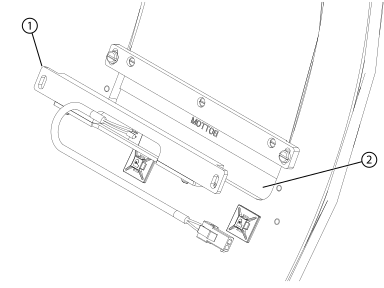
| 1 | Bore light |
| 2 | Illumination panel |
- Install the two screws securing the bore light to the body coil.
Figure 2. Bore light screws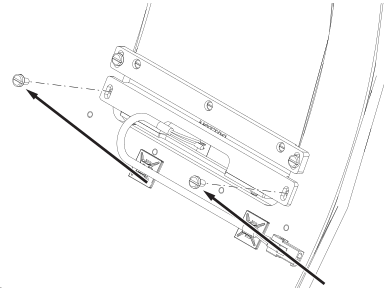
- Connect the bore light electrical connector.
Figure 3. Bore light electrical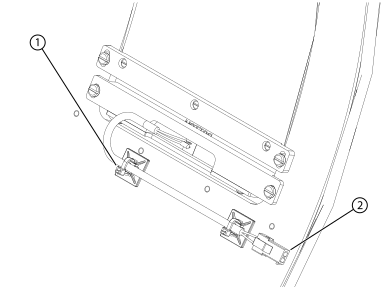
| 1 | Cable tie |
| 2 | Electrical connector |
- Install two cable ties securing the electrical cable to the body coil.
Finalization
After removing LOTO and starting up the host computer, make sure the bore light operates normally.