- SIGNA MR355 / SIGNA MR360
- Service Manual
- 5856356-3EN Revision 5.0
- Basic Service Documentation. Copyright General Electric Company.
- 00000018WIA30C5B260GYZ
- id_20297941.7
- Jan 8, 2021 12:52:24 PM
Determining if an MRI scanner is connected to IPM
Look at the MRI configuration to determine if the scanner is connected to IPM.
Procedure
- Open the Common Service Desktop and select .
Result
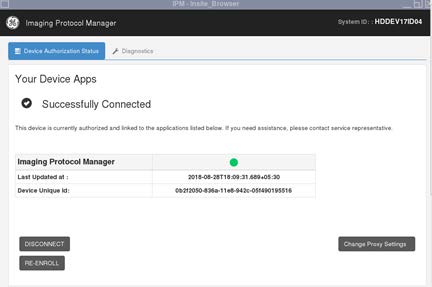
If the IPM is connected, the screen displays Successfully Connected and a green circle to the right of Imaging Protocol Manager.Figure 1. IPM Device Authorization Status