- id_2016631
- Version: 5.0
- Date: Dec 6, 2019 3:11:52 AM
Removing LOTO - PGR PDU/Gradient Subsystem
Procedure
- Alert necessary personnel that power is being restored.
- Remove the lock and tag.
- Switch on the MDP's PDU breaker.
- Remove personal LOTO device(s) from the front panel of the PGR PDU.
- Rotate the larger main breaker labeled INPUT clockwise to the red On (1) position.
Figure 1. Power on the PGR PDU and remove LOTO
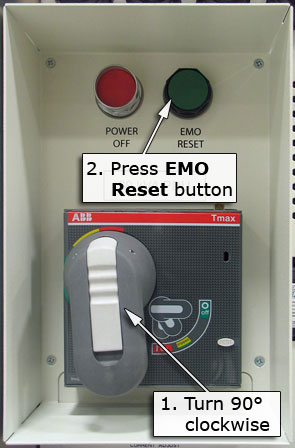
- Press the green EMO RESET button.
- Power up the host PC.