- id_2019786
- Version: 2.0
- Date: Oct 13, 2019 9:24:32 PM
Installing additional BrainWave On Console cables
Procedure
- In the control room and equipment room:
- Attach the cable to one of the 9-pin filters at the sub-panel.
Figure 1. Sub-panel with cable installed
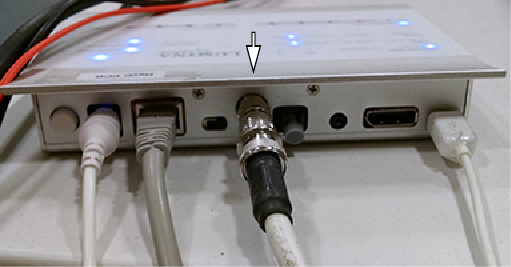
- Insert the other end of the cable into the back of the Cedrus Lumina control unit, and put it on the GOC.
Figure 2. Cedrus Lumina Controller with cable installed
- Attach the cable to one of the 9-pin filters at the sub-panel.
- In the magnet room:
- Attach the shielded cable to the other side of the 9-pin filter inside the magnet room at the sub-panel.
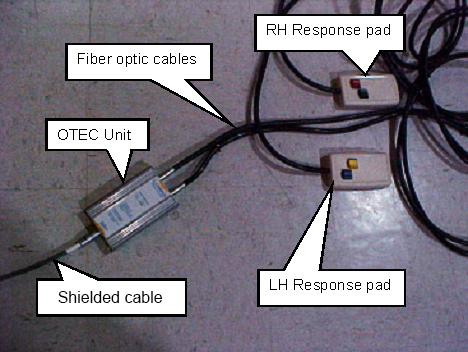
- Attach the other end of the shielded cable to the OTEC unit inside the magnet room.
Figure 3. OTEC unit and response pads
- If you are installing video hardware on a Dell T5820 PC, install the Dongle mini DP male to DP female (5795077) to DisplayPort to VGA Video Adapter Converter (5748906) and then use the VGA adapter Converter to connect to the display (either monitor or goggles).note: In case the display connectors are still not compatible, request the 3rd Party Display solution provider to supply adapters as necessary.
- To connect the trigger cable:
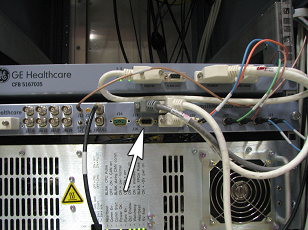
- Open the pen cabinet. Install the trigger cable on J16 on the exciter. This cable can go through the top of the PEN cabinet.
Figure 4. J16 location on master exciter board
- Open the pen cabinet. Install the trigger cable on J16 on the exciter. This cable can go through the top of the PEN cabinet.