- SIGNA™ Hero 3.0T Service Methods
- 5852800-8EN Revision 1.0
- 00000018WIA302FFA40GYZ
- id_20165354.1
- Jul 13, 2021 4:16:32 PM
Applying LOTO - Global Operator Cabinet (GOC) and operator workspace
Apply LOTO before servicing the GOC or items in the operator workspace. Applying LOTO ensures a safe environment when working on these items.
Prerequisites
| Personnel requirements | |||
|---|---|---|---|
| Required persons | Preliminary requirements | Procedure | Finalization |
| 1 | Not Applicable | 10 minutes | Not Applicable |
| Tools and test equipment | |||
|---|---|---|---|
| Item | Quantity | Part number | Manufacturer |
| Brass Master Padlock with Brass Shackle | 2 | 46-194427P320 | - |
| Red LOTO Personal Lock Wrap | 1 | 2393068 | - |
| Multi-Locking Device (if multiple service personnel are involved) | 1 | 46-194427P313 | - |
| Red Warning LOTO Tag | 1 | 46-194427P322 | - |
| Safety |
|---|
|
Before working in any GE Healthcare MR suite or performing any GE Healthcare service procedure, you must:
If you have any safety concerns at any time, do not begin work or immediately stop work and move to a safe location. Immediately contact your supervisor or site safety officer for instructions on how to proceed. |
| ||||
About this task
Prior to performing work on the Global Operator Console (GOC) or items in the Operator Workspace, a LOTO-authorized GE Field Engineer (FE) must perform the steps in this Lock Out / Tag Out (LOTO) Procedure. Completing all steps in this procedure ensures a safe environment when working on these parts.
Procedure
- Open plastic Cover. Remove power to the Operators Workspace by shutting off the HOST breaker on the front of the PDU.
Figure 1. Breaker Locations on PDU 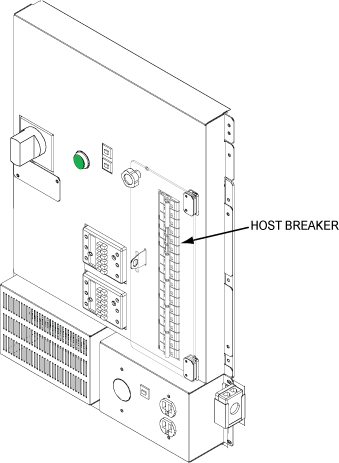
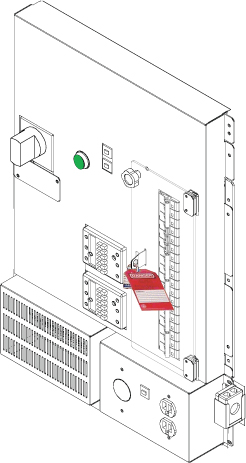
- Lock and Tag the Breaker Panel on the PDU.
Figure 2. Lock and Tag the Breaker Panel