Room ambient and bore temperature sensors replacement
Prerequisites
Table 1. Personnel requirements
Required persons
Preliminary requirements
Procedure
Finalization
1 person for each sensor replacement procedure
Not Applicable
5 hours for bore temperature sensor; 1 hour for room ambient temperature sensor
15 minutes
Table 2. Tools and test equipment
Item
Quantity
Effectivity
Part number
Manufacturer
Digital Volt Meter
(DVM)
1
-
-
-
Nonmagnetic Titanium Service Tool Kit, Large Set
1
-
5112581
-
Table 3. Replacement parts
Item
Quantity
Effectivity
Part number
Manufacturer
Bore Temperature
Cable and Sensor (Run 3350, MAG-SRI-J10 to Mag-Bore, Bore Temp Sensor)
1
-
See FRU Manual
-
Left-Front Arc Cover Assembly (includes Room
Ambient Temperature Sensor)
1
-
See FRU Manual
-
Table 4. Required conditions
Condition
Reference
Effectivity
Be sure that the left-front arc cover assembly and the bore temperature cable and sensor have all the required contents.
-
-
About this task
This procedure describes the
replacement of the two temperature sensors associated with the magnet.
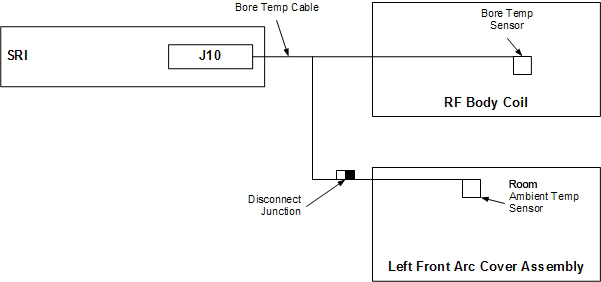
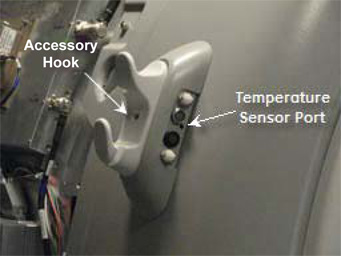
The location of the room ambient temperature sensor depends on the
system. The sensor is located in the patient monitoring accessory
hook on the left side of the enclosure (see Figure 2). The patient bore temperature sensor is located inside the RF
body coil. The bore temperature cable connects to the room ambient
temperature sensor, and the patient bore temperature sensor connects
to the SRI. The room ambient temperature sensor and cable plug into
the bore temperature cable (see Figure 1). When replacing the room ambient temperature sensor, the left-front
arc cover assembly must also be replaced, because the sensor is epoxied
into the arc cover.
Figure 1. Room ambient and bore temperature sensors
Topic ID: id_SL1991687-1061576
Room ambient temperature sensor replacement
Procedure
Apply LOTO on the RF amplifier and PEN cabinet. See the MR Service Safety Manual, PN 5452735.
Disconnect the patient monitoring connectors from the accessory hook.
Figure 2. Accessory hook
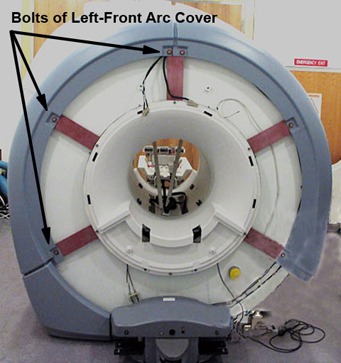
Remove the left-front arc cover assembly. There are three bolts on the front and one bolt on the side.
Figure 3. Left-Front arc cover assembly
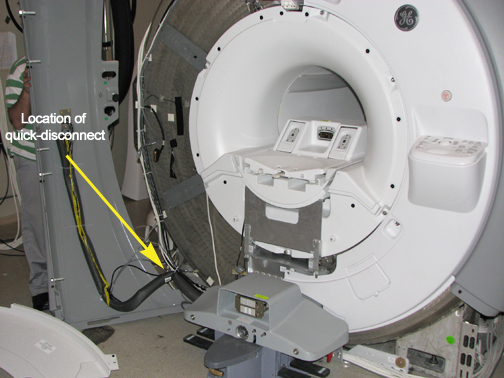
Disconnect the room ambient temperature sensor from the bore temperature sensor cable. The room ambient temperature sensor cable is approximately 72 inches (180 cm) long and the connector should be near the bottom of the left-front arc cover.
Figure 4. Connector at bottom of Left-Front arc cover
Disconnect the remaining cables/hoses from the left-front arc cover
assembly.
To install a new room ambient temperature sensor, follow Step 1 through Step 7 (above) in reverse order.
Topic ID: id_SL1991695-1061576
Patient bore temperature sensor replacement
Procedure
Perform LOTO on the RF amplifier
and PEN cabinet. See the MR Service Safety Manual, PN 5452735.
Disconnect the bore temperature sensor cable from J10 on the
SRI under the left side of the magnet enclosure and pull to the front
of the magnet.
Disconnect the room ambient temperature sensor cable. The room
ambient temperature sensor cable is approximately 72 inches (180 cm)
long and the connector is near the bottom of the left-front arc cover.
Note: As long as the rear end bell is in place and the RF body coil is returned to the bore in the same orientation as it was removed, then RF coil tuning will not be affected. It may be necessary to mark the original body coil position.
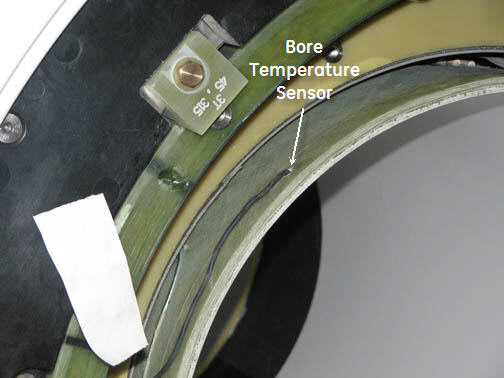
Carefully remove the tape located under the sensor. Keep the
tape to reused it later.
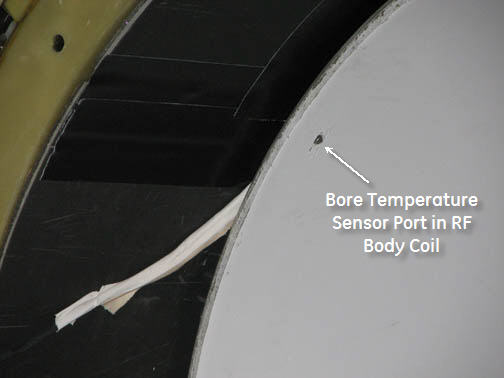
Pull the sensor from the RF body coil port.
Remove the bore temperature sensor cable by threading it through
the magnetic enclosure.
Route the new cable through the magnet enclosure and tape it
to the RF body coil at the 315 position. Reconnect the bore temperature
sensor cable at J10 on the SRI under the left side of the magnet enclosure,
and reconnect the room ambient temperature sensor cable.
Figure 5. Bore temperature sensor cable
Insert the bore temperature sensor into the port in the RF body
coil and secure it with tape.
Figure 6. RF body coil port
Replace the RF body coil, front end bell, split bridge, and
covers per Step 1 through Step 7 (above) in reverse order. Take care to not pinch the cable.
Topic ID: id_14998828
Finalization
Finalization
Remove LOTO from the PEN cabinet. See the MR Service Safety Manual, PN 5452735.
Perform a quick head and body scan to ensure that the system is functioning properly.