
- Discovery MR750 3.0T System Service Methods
- 5690009-2EN Revision 4
- 00000018WIA300FC030GYZ
- id_123749221.3
- Jul 5, 2019 6:08:28 PM
Bore Light Replacement
Prerequisites
| Required persons | Preliminary requirements | Procedure | Finalization |
|---|---|---|---|
| 1 | Not Applicable | 30 minutes | Not Applicable |
| Item | Quantity | Effectivity | Part number | Manufacturer |
|---|---|---|---|---|
| Non-Magnetic Service Tool Kit | 1 | - |
5112581 | - |
| Item | Quantity | Effectivity | Part number | Manufacturer |
|---|---|---|---|---|
| LED Bore Light Source | 1 | - |
5173982 | - |
About this task
Overview
This document contains the procedures for replacing the LED light source used for the fiber optic bore lights.
Procedure
- Remove rear pedestal side cover screws, and remove the side
covers.
Figure 1. Remove Rear Pedestal Side Cover 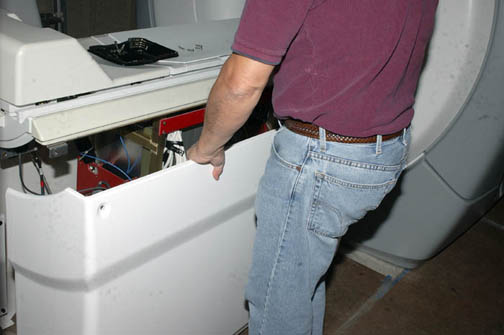
- Loosen the 2 hand tightened screws that secure the fiber optic
cables, and remove the cables.
Figure 2. LED Bore Light Module 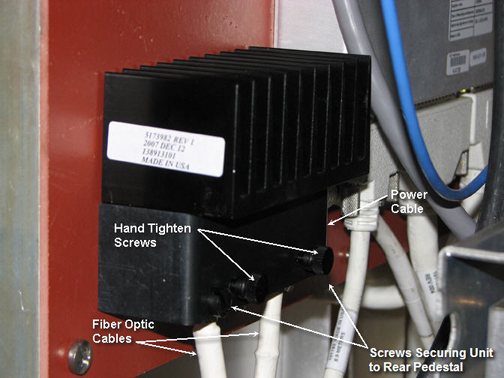
Finalization
No finalization steps.