
- Discovery MR750 3.0T System Service Methods
- 5690009-2EN Revision 4
- 00000018WIA303AF030GYZ
- id_123738881.18
- Oct 11, 2021 3:47:40 PM
PAC and SRI-4 Replacement
Prerequisites
| Required persons | Preliminary requirements | Procedure | Finalization |
|---|---|---|---|
| 1 | Not Applicable | 30 mins. for PAC; 45 mins. for SRI | 30 minutes |
| Item | Quantity | Effectivity | Part number | Manufacturer |
|---|---|---|---|---|
| Nonmagnetic service tool kit | 1 | - |
5112581 | - |
| Item | Quantity | Effectivity | Part number | Manufacturer |
|---|---|---|---|---|
| PAC-2BV FRU | 1 | - | - | - |
| PAC-5 FRU | 1 | - | - | - |
| ||||

About this task
Overview
This procedure explains replacement of the physiological acquisition controller (PAC) assembly and the scan room interface (SRI-4) on a fixed site system.
Removal of the PAC
Procedure
- Perform LOTO on the RF amplifier and PEN cabinet. See the MR Service Safety Manual, PN 5452735.
- Disconnect all cables attached to the side of the PAC.
- Remove the screws securing the PAC and PAC interface to the electronic rack.
Installation of the New PAC
Procedure
- Check the alignment of the PAC with the enclosure in all three
planes.
-
There are adjustment screws that allow for adjustment up/down, left/right, and in/out.
-
Adjust the PAC I/O panel so that it lines up with the slot in the enclosure in the left/right and up/down plane, and adjust it in/out so the gap between the I/O panel and the enclosure is less than 1 mm.
Figure 1. PAC Alignment (RRx Systems) 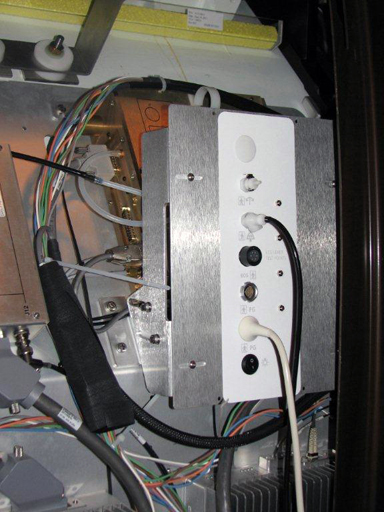
-
Removal of the SRI
Procedure
- Disconnect the cables attached to the SRI.
Figure 2. SRI Cable Map 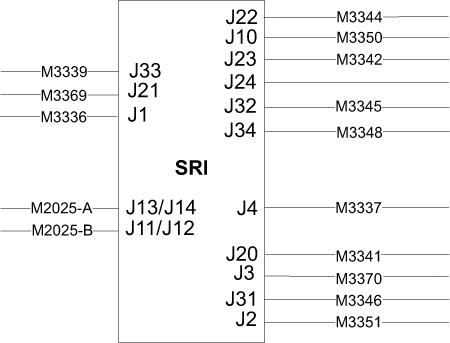
Installation of the New SRI
Procedure
- Place the new SRI in the proper location, and install in the reverse order of how it was removed.
- Mount the removed temperature sensor box on the replacement SRI.
- Reconnect the cables and replace the enclosure panels.
- Remove LOTO and restore power to the system. See the MR Service Safety Manual, PN 5452735.
Finalization
Procedure
- Perform a TPS reset.
- Confirm that the reported problem has been resolved by running PAC or SRI diagnostics. In Service Methods, instructions for these diagnostics can be found in Troubleshooting > Diagnostics > Hardware Location > Magnet Room > PAC Diagnostic Tests and SRI Functional Diagnostics.
- Perform a Check Scan.