
- Discovery MR750 3.0T System Service Methods
- 5690009-2EN Revision 4
- 00000018WIA30AEC030GYZ
- id_123736651.11
- Oct 11, 2021 3:47:43 PM
Body Hybrid Replacement
Prerequisites
| Required persons | Preliminary requirements | Procedure | Finalization |
|---|---|---|---|
| 2 for MR750; 1 for MR450, MR450w, MR450w GEM | Not Applicable | 30 minutes | 30 minutes |
| Item | Quantity | Effectivity | Part number | Manufacturer |
|---|---|---|---|---|
| Non-Magnetic Service Tool Kit | 1 | - |
5112581 | - |
| Item | Quantity | Effectivity | Part number | Manufacturer |
|---|---|---|---|---|
| 3.0T Body Hybrid Module | 1 | - |
See FRU Manual | - |
| ||||||||

Removing Body Hybrid Splitter
Procedure
- Remove the lower side cover and upper magnet side cover to access the body hybrid module.
Figure 1. Removing Upper Magnet Side Cover 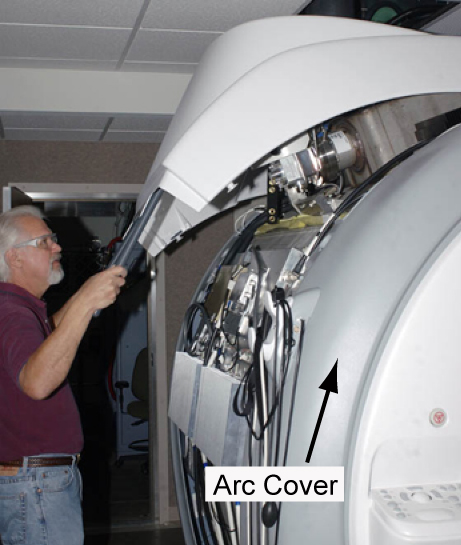
- Remove the 4 screws holding the body hybrid module to the magnet.
Figure 2. 3.0T Body Hybrid Module 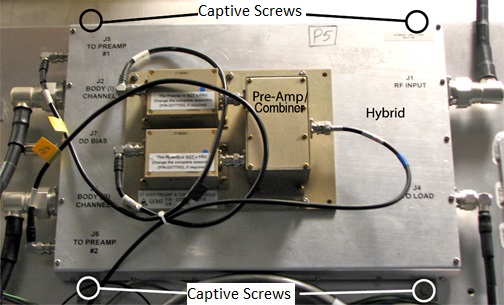
Remove the module from the magnet room, and keep it as far away from the magnet as possible.CAUTION 
Installing Body Hybrid Module
Procedure
- Attach the new brackets to the new body hybrid module.
Move the module into the magnet room, and keep it as far away from the magnet as possible.CAUTION - Reconnect all cables to the body hybrid.
- Install the brackets from the old module onto the new module.
- Secure the module to the magnet by tightening the 4 screws provided.
- Replace all covers in reverse order.
- Remove LOTO and reapply power to the system. See the latest revision of the MR Service Safety Manual, PN 5452735.
Finalization
Procedure
- Perform a TR Dynamic Disable Calibration.
- Follow the Calibrating RF Amplifier and UPM or RF Amp and Power Monitor (RAP) Tool for single drive or Calibrating RF Amplifier and UPM or RF Amp and Power Monitor (RAP) Tool for dual drive procedure.Perform an .
- Perform System gain calibration.
- Complete a body and head scan to make sure the system is functional (see Check Scan).