
- Discovery MR750 3.0T System Service Methods
- 5690009-2EN Revision 4
- 00000018WIA3094AE20GYZ
- id_131071703.1
- Oct 11, 2021 8:47:14 PM
Skirt cover removal and installation
Prerequisites
| Personnel requirements | |||
|---|---|---|---|
| Required persons | Preliminary requirements | Procedure | Finalization |
| 1 | Not Applicable | 5 minutes | Not Applicable |
| Tools and test equipment | ||||
|---|---|---|---|---|
| Item | Quantity | Effectivity | Part number | Manufacturer |
| Screwdriver | 1 | - | - | - |
| Cut-Resistant Gloves | 1 pair | - | - | - |
| ||||

| Required conditions | ||
|---|---|---|
| Condition | Reference | Effectivity |
| Rear pedestal side cover has been removed (rear skirt cover only). | - | - |
| Side cover has been removed for the MR450w. | - | - |
Remove skirt covers
Procedure
- The skirt covers are held into place using poppers and screws.
There is one screw that secures each skirt cover to the magnet. Remove
the screw from the skirt cover being removed.
Figure 1. Screw Location - Front Cover 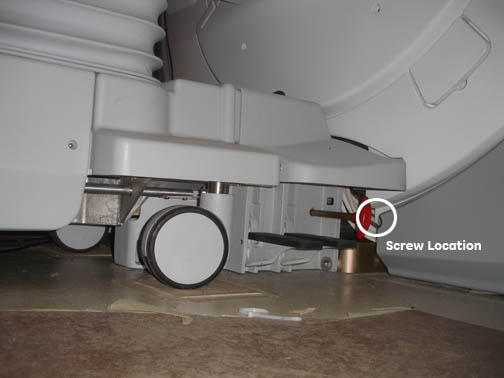
Figure 2. Screw location - rear cover 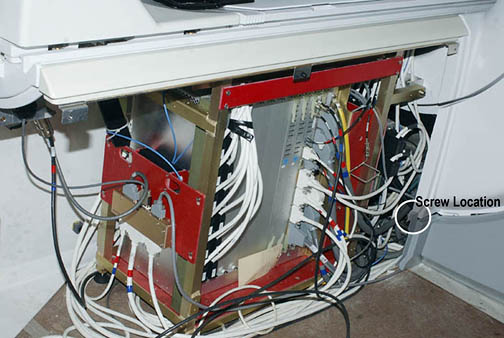
- To remove a skirt cover simply slide it towards the front (or,
in the case of the back covers, to the rear) of the magnet (see Figure 3).
Figure 3. Removing skirt covers 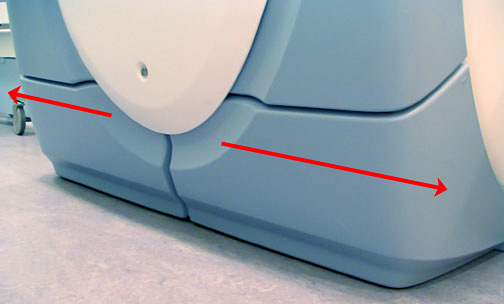 Note: The rear pedestal cover has to be removed before removing the rear skirt cover.
Install skirt covers
Procedure
- Snap popper on the skirt cover into place and replace the screw, located toward the center of the magnet Figure 4.
Figure 4. Aligning the skirt's hook with the arc cover's slot 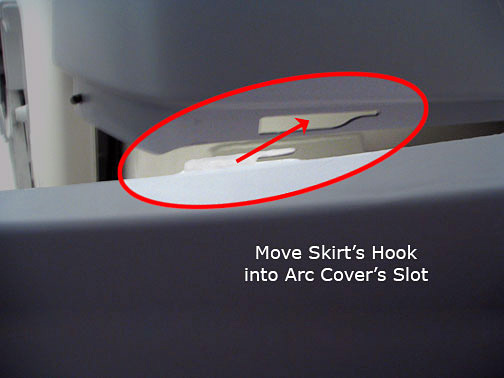
Figure 5. Aligning Skirt Tabs 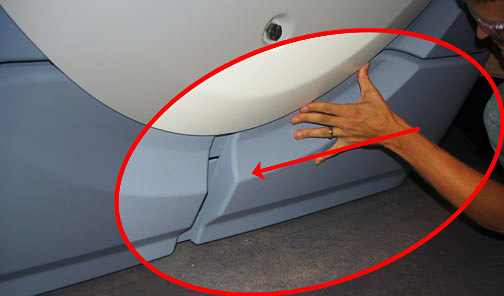
Finalization
Finalization
No finalization steps.